
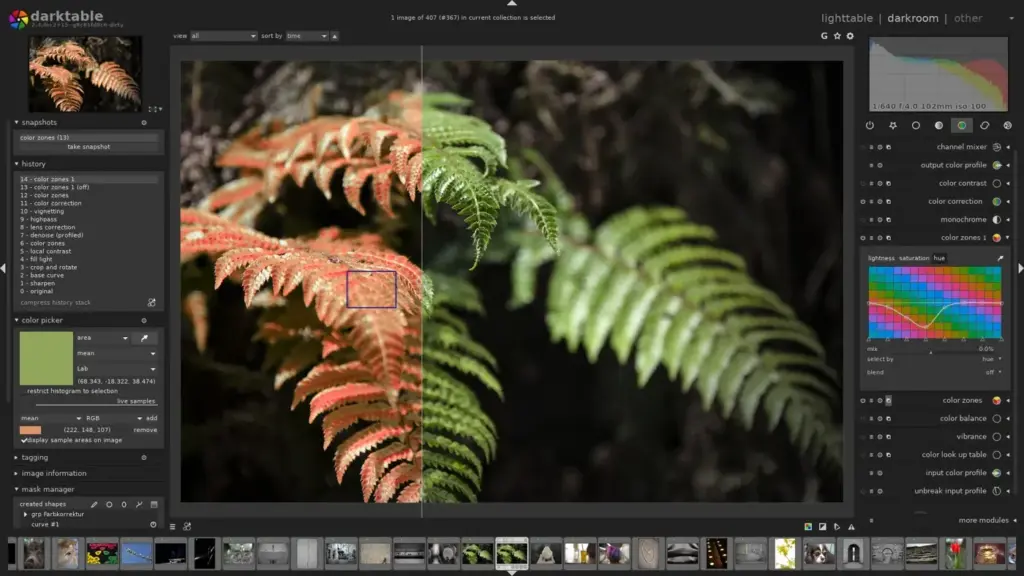
This darktable review finds a free, open-source raw editor with powerful tools, deep control and no subscription. It rivals commercial programs in features, including masks, color work and noise reduction. The interface is complex and the learning curve is steep, so it suits patient photographers who enjoy tinkering.
Verdict From This Darktable Review
Darktable is a full raw workflow application that costs nothing. It includes a library, tethering support, non-destructive editing, parametric and drawn masks, and modules for nearly every task, from exposure to color grading and noise reduction.
Power comes with complexity. The program exposes many modules, and its newer scene-referred workflow uses concepts that may be unfamiliar. New users often need time and guidance before their results look as good as those from simpler editors.
For photographers who enjoy learning and want to avoid subscriptions, it is one of the best free tools available.
Performance and Reliability
Performance depends on your computer. A modern processor and graphics card make editing smooth, with OpenCL acceleration speeding up many modules. On older machines, complex edits with many masks can lag, and large libraries take time to index. The program is stable for everyday work, though advanced settings can cause surprising results if misconfigured. Adjusting the cache size, enabling GPU processing and exporting at sensible sizes keeps sessions manageable. Enabling OpenCL requires a supported graphics driver, so check the project documentation if modules seem slow. Many users also keep a smaller export size for proofing and render full-size files only for final delivery, which saves time on large shoots.
Key Features
Non-Destructive Raw Workflow
Edits are stored in sidecar files and a database, leaving originals untouched. Understanding raw vs JPEG explains why raw editing is so flexible.
Masks and Local Adjustments
Drawn and parametric masks allow precise control over exposure, color and contrast. The ideas parallel layer masks.
Color and Tone Tools
Modules like color balance and filmic-style tone mapping give fine control over tone and color. See dynamic range for context on shadows and highlights.
Noise Reduction and Sharpening
Several denoise modules, including profile-based options, help clean high-ISO files. Background on noise appears in photon shot noise.
Library, Tethering and Export
A lighttable view handles culling, tagging and exporting, and tethered shooting works with many cameras.
Learning Curve and Support
Expect a real learning curve. The interface lists many modules, and the recommended workflow differs from other editors. Excellent written documentation and video tutorials from the community make learning far easier, and the user forums are active. Beginning with a basic set of modules, such as exposure, color balance and a denoise tool, and ignoring the rest at first is a practical way to start. Within a month you can be productive. Joining the community forums and watching a few recorded walkthroughs of the scene-referred workflow can save weeks of trial and error. Try editing the same photo with and without the filmic-style tone mapping to see what each step does, and keep notes about settings you like.
Pricing
Darktable is free and open source, with no paid version and no subscription. Development is funded by volunteers and donations.
There is nothing to buy, but you may want to budget time for learning, plus a reasonably powerful computer for smooth performance.
Because it is community-driven, updates arrive on the project schedule rather than a commercial one, so check the project site for the current release.
Is It Good Value?
The value is obvious because it is free. The real cost is your time. If you enjoy learning tools and want long-term freedom from subscriptions, the investment pays off. If you need quick results for paid work and have no time to learn, a commercial editor may be more practical. Consider making a small donation to the project if it becomes central to your workflow. Because it is open source, you can also inspect, share and keep any version you like, so your workflow never depends on a license or on a company changing its terms. Sidecar files are plain and portable, which makes long-term archives easier to manage.
Pros and Cons
What It Does Well
- Free with no subscription or license limits.
- Very powerful masks and color tools.
- Cross-platform support, including Linux.
- Active community and thorough documentation.
- Non-destructive editing with sidecar files.
Where It Falls Short
- The learning curve is steep.
- The interface is dense and can overwhelm beginners.
- Default raw rendering may look flat until adjusted.
- Some camera and lens profiles are less complete than commercial tools.
- Performance can lag on older computers.
Bottom Line
Darktable is a remarkable free tool that can match commercial software when you learn it. It asks for time and patience, and the reward is control and independence. If you like to understand your tools, give it a month. If you want instant polish, try a simpler editor first and return later. Back up both your photos and the sidecar files together, since the edits live there. Keep an installer for the version you rely on, so a future update never surprises you mid-project.
Who It Is For
Darktable suits photographers who want a professional-level raw editor without cost, those who use Linux and anyone who values open software. It rewards patience and curiosity.
If you want fast, easy results and polished presets, a commercial editor may be less frustrating. People who need a mobile ecosystem will also miss it.
Pair learning the software with a grounding in exposure. The lessons on ISO and lens aberrations help you understand what the corrections are doing.
Getting Started
Install the program, import a small folder and open one image in the darkroom view. Start with the exposure and color calibration modules, then use a mask to brighten a subject. Try noise reduction on a high-ISO photo and compare. Export a JPEG and review the result. Look up one concept at a time in the documentation rather than trying to learn everything at once, and save a style you like so you can reuse it.
Before You Buy
Before committing to Darktable, run a short checklist. Confirm that your computer meets the system requirements, download the trial or free version if one exists, and test it on a real project from your own library rather than a demo file. Compare the exported result with what you get from your current tool, note how long each step takes, and check the vendor site for current pricing and upgrade terms. A program that suits the way you already work is worth more than one with a longer list of features.
Alternatives
Free and paid alternatives are plentiful.
| Alternative | Best Reason To Pick It |
|---|---|
| RawTherapee | Another free raw editor with deep controls |
| Adobe Lightroom Classic | Polished commercial workflow and library |
| DxO PhotoLab | Excellent noise reduction and corrections |
| GIMP | Free pixel editor for retouching after raw development |
Spend a week with a tutorial series before judging darktable, since first impressions can be misleading.
Common Questions
Is darktable really free?
Yes. It is free and open source, with no paid version or subscription.
Is darktable good for beginners?
It can be, but the learning curve is steep. Following a structured tutorial helps a lot.
Can darktable replace Lightroom?
For raw editing and library work, many photographers use it as a full replacement, though it lacks cloud syncing and mobile apps.
Does it run on Linux?
Yes. It runs on Linux, Windows and macOS.
Try It Yourself
See what it can do on your own photos and footage.
Some links are affiliate links: if you buy through them we may earn a small commission at no extra cost to you. How this works.