
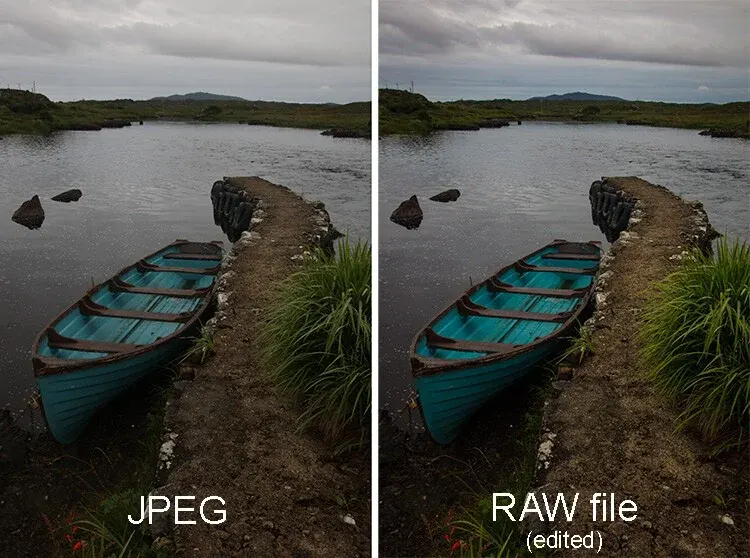
RAW vs JPEG is the choice between an unprocessed sensor file and a finished, compressed picture. RAW keeps all captured data at 12 to 14 bits per channel for heavy editing, while JPEG is smaller, ready to share and baked with the camera’s settings at 8 bits.
Why It Matters
This setting affects every photograph you take, and it cannot be undone after the fact. A JPEG with blown highlights or the wrong white balance has far less room to be rescued than the same moment captured as RAW.
On the other hand, RAW files are larger, need processing and fill cards quickly. Picking the right format for each job saves time, storage and frustration.
Beginner RAW vs JPEG For New Photographers
What Each File Contains
A RAW file stores the sensor data with minimal processing, plus settings as metadata that you can change later. A JPEG is the camera’s finished interpretation of that data. It applies white balance, contrast, color and sharpening, then compresses the result and discards information.
| Feature | RAW | JPEG |
|---|---|---|
| Bit depth | 12 to 14 bits | 8 bits |
| File size | Large, often 25 to 70 MB | Small, often 5 to 15 MB |
| Editing latitude | High | Limited |
| White balance | Adjustable later | Fixed in the file |
| Ready to share | No, needs conversion | Yes |
| Burst speed | Can be slower | Often faster |
When To Shoot RAW
– Landscapes, portraits and weddings where quality matters.
– Difficult light with bright skies and deep shadows.
– Anything you will edit seriously.
– Scenes where you are unsure of white balance.
When JPEG Is Fine
– Quick snapshots to share the same day.
– Events with huge numbers of frames and fast delivery.
– Sports bursts where buffer speed matters.
– Cases where you want camera-made color with no editing.
Shooting Both
Most cameras have a RAW plus JPEG option that writes both files. It uses more card space, but gives a ready preview with a safe master. Use it when you want fast sharing without giving up the edit-ready original.
Common Mistakes
– Shooting JPEG in tricky light and then trying to fix the exposure.
– Shooting RAW and never editing, which leaves flat-looking files.
– Deleting RAW files after exporting without keeping a backup.
– Assuming RAW magically fixes bad focus or motion blur.
Handy for this: Pen Tablet — precise retouching. (affiliate link)
Advanced RAW vs JPEG: Latitude, Compression And Workflow
Bit Depth And Tonal Latitude
An 8-bit JPEG holds 256 levels per channel, around 16.7 million colors. A 14-bit RAW file holds 16,384 levels per channel. When you stretch shadows by several stops, those extra levels prevent visible banding and posterization. See raw bit depth for the details, and dynamic range for why highlight and shadow recovery differ.
What JPEG Compression Throws Away
JPEG uses lossy compression based on blocks of pixels and reduces chroma resolution. At high quality, the loss is hard to see, but repeated edits and saves accumulate artifacts, particularly around edges and in smooth gradients. RAW files are either uncompressed or use lossless or visually lossless compression, preserving data, though some cameras offer a smaller lossy raw option.
White Balance And Exposure Recovery
Because white balance is only a tag in a RAW file, changing it later is lossless. In a JPEG it is applied to the data, so a big correction can amplify noise and cause color shifts. Exposure recovery works similarly: you can often bring back one or two stops of highlight detail from a RAW, and a stop or more of shadows, whereas a JPEG clips sooner. Read more at shadow detail recovery and white balance science.
Camera Processing And Picture Styles
JPEG appearance depends on your picture style and in-camera settings, which you can adjust before shooting. For ideas, see picture styles and creative looks. Raw files also show the camera’s style in the preview, though the data itself remains untouched.
Newer Formats
Some cameras now offer HEIF, which compresses better than JPEG and can store 10 bits. See HEIF vs JPEG for that choice. Compressed or lossless raw options trade space for flexibility, and your editor must support the camera’s format.
Workflow And Storage
RAW demands more storage and processing. Plan for fast cards, large drives and a backup routine. Follow the 3-2-1 backup strategy, and build presets in your editor to speed up sorting through large shoots. Many photographers shoot RAW to one card and JPEG to another, so a quick edit and a safe original exist at once, which is possible with dual card slots.
Editing Latitude In Practice
Imagine photographing a wedding dress by a window. In a JPEG, the dress may clip to pure white while the room looks dark. In a RAW file you can pull highlights down by a full stop or more and recover lace and fabric texture, then lift the shadows to show faces. The same limits apply the other way: heavy shadow lifts at high ISO bring out noise, and no RAW file can bring back a fully clipped channel. RAW gives margin for error, not permission to ignore exposure.
Sharpening, Noise And Lens Corrections
JPEG output usually includes noise reduction and sharpening applied by the camera, and these cannot be removed. In RAW you choose the amount and can use modern tools for denoising, which often beat in-camera results. Lens corrections for distortion, vignetting and chromatic aberration are also applied as profiles during raw conversion. Some mirrorless cameras apply them to JPEG automatically, and in RAW the software does it later, so check that the correction profile is enabled when you edit.
Color Space And Output
JPEG files are typically tagged with sRGB or Adobe RGB. RAW files have no color space until you convert them, and editing programs show them in a large working space before export. When you finish, export in sRGB for the web and a larger space for print workflows where the lab supports it. See color spaces compared to choose well.
A Sensible Rule For Choosing
Shoot RAW whenever the picture matters and you have time to process it. Shoot JPEG when speed and file size matter more than editing latitude. If you are unsure, shoot RAW plus JPEG for a month and look at how often you actually need the raw file. Most people find they reach for it more than they expected, and that is a good answer for a default setting.
Try It
- Set your camera to RAW plus JPEG and photograph a scene with a bright window and a shaded interior.
- Open both files in an editor and lift the shadows by two stops on each.
- Change the white balance by 1500 K on both and compare the color and noise.
- Note the file sizes and decide which format fits your next outing.
Common Questions
Is RAW always better than JPEG?
RAW gives more editing room and quality, but it is not always better for the job. JPEG suits fast sharing, big event volume and moments where you will not edit.
Can I convert JPEG to RAW?
No. Converting a JPEG to a raw format cannot restore data that compression discarded. You can only save a copy in another container.
Does RAW look flat?
A raw file shows less contrast and sharpening than a finished JPEG because the camera has not applied its styling. Editing adds the look you want.
Does RAW slow down my camera?
It can, since files are larger and fill the buffer sooner. Fast cards and a camera with a large buffer reduce the effect during bursts.
Related Lessons
- RAW Bit Depth for why 14 bits matters when editing.
- HEIF Vs JPEG for a newer compressed format.
- Picture Styles And Creative Looks to shape the camera’s JPEG output.
- Dual Card Slots for storing both formats safely.
- The 3-2-1 Backup Strategy for protecting your originals.
Gear That Helps With This
Hand-picked kit that makes this lesson easier to put into practice.
Some links are affiliate links: if you buy through them we may earn a small commission at no extra cost to you. How this works.