
This adobe after effects review finds it the standard tool for motion graphics, compositing and visual effects, with unmatched plug-in support and expression-based control. It rewards patient learners but punishes impatient ones with a steep curve and slow previews. It is excellent for titles and animation, and unnecessary for straightforward video cutting.
Verdict From This Adobe After Effects Review
After Effects is where titles fly in, logos animate and screens get composited into footage. It treats everything as layers on a timeline, each with properties that can be keyframed, linked and automated, and that model has stayed consistent for decades.
It is not a video editor. Cutting an interview or a wedding film in After Effects is awkward, and you should do that in Premiere Pro or another editor. Where it excels is the extra layer: animated graphics, cleanups, replacements and effects.
Be prepared for demanding hardware. Previews rely on RAM and fast storage, and complex scenes may need rendering in the background before they play smoothly.
Performance and Reliability
After Effects is one of the most demanding creative programs. It caches frames to memory and disk so playback can be smooth, but complex compositions need substantial RAM, and a fast solid state drive helps the disk cache. Rendering can be slow, and exports are often handed to a separate render queue or to Media Encoder so you can keep working. Stability is generally good, although heavy plug-ins can cause trouble. Lowering preview resolution, using proxies and precomposing finished sections are the standard ways to keep sessions responsive.
Key Features
Keyframes and the Graph Editor
Every property can be animated, and the graph editor lets you shape speed and easing with curves. The lesson on keyframes and the graph editor is the most important starting point.
Expressions
Short snippets of code can link properties, loop motion or add wiggle without manual keyframes. Begin with expressions basics and you will save huge amounts of repetitive work.
Text Animators
Text layers can be animated per character, word or line with range selectors. See text animators for professional-looking titles.
Precomposing and Organization
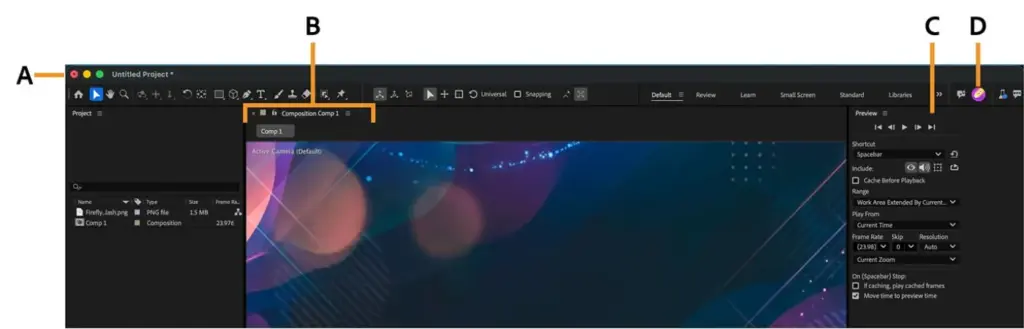
Precomps group layers into reusable units that keep complex projects readable. Precomposing is the habit that separates tidy projects from chaos. You can also review the After Effects interface for orientation.
Effects, Tracking and Roto
Built-in tracking, the roto brush, masks and a deep effects library handle many compositing tasks. Third-party plug-ins extend this considerably, though many are sold separately.
Learning Curve and Support
The core ideas are simple: layers, properties and time. The challenge comes from the sheer number of effects and the depth of expressions and scripts. Adobe offers official tutorials, and a vibrant community of motion designers shares projects and courses. Many beginners learn fastest by recreating a short animation they admire, step by step. Expect a few weeks to become comfortable with keyframes and easing, and several months to feel confident with expressions, shape layers and compositing workflows.
Pricing
After Effects is available as a single-app subscription or as part of the Creative Cloud collection. Single-app pricing has typically been about $20 to $35 a month, with discounts for annual commitments and for students.
A free trial is generally available, and there is no perpetual license. Check the vendor site for current pricing, as plans change.
If you already subscribe to Premiere Pro, the full collection is usually the cheaper route to getting After Effects too.
Is It Good Value?
The subscription cost is easy to justify if you produce motion graphics regularly, since templates and plug-ins can save hours. It is harder to justify for someone who needs two or three animated titles a year. In that case, the title tools in your editor or a lower-cost motion application may do the job. Remember that serious users often pay extra for plug-ins, so factor in a modest add-on budget. The dynamic link with Premiere Pro is a real time saver for editors.
Pros and Cons
What It Does Well
- The most widely used tool for motion graphics, so help is everywhere.
- Expressions and graph editing give exact control over animation.
- Huge market of templates, scripts and plug-ins.
- Dynamic linking with Premiere Pro keeps edits in sync.
- Strong text, shape and masking tools.
Where It Falls Short
- The learning curve is steep, especially for expressions.
- Real-time previews depend heavily on RAM and storage.
- Subscription only, without a one-time purchase.
- Awkward for long-form editing.
- Many plug-ins are extra costs.
Bottom Line
After Effects is the safe, standard choice for motion graphics, and that matters when you rely on templates, plug-ins and a community that all assume you are using it. It is not the easiest or cheapest route, and some projects belong in simpler tools. If animation and effects are part of your regular work, the investment in learning and paying for it returns itself many times over. If you only animate occasionally, start with the tools you already have and upgrade when you reach their limits. Whatever you decide, learn the fundamentals of keyframes and easing first, because those skills carry over to nearly every motion tool on the market.
Who It Is For
After Effects suits motion designers, video editors who add titles and effects, and creators who want polished intros and lower thirds. It is also useful for compositing screens, removing objects and creating simple visual effects.
If you only need basic titles, the title tools in your editor may be enough. If your needs are node-based compositing, DaVinci Resolve with Fusion is a free alternative. For a first look, the Fusion introduction shows how that approach differs.
Learn expressions slowly, one useful snippet at a time, rather than trying to master scripting at once.
Getting Started
Start by creating a composition that matches your video settings, then import a logo or image. Animate its position and scale with keyframes, open the graph editor and soften the motion with easy ease. Add a text layer and apply an animator preset, then try precomposing a group of layers. Preview with a lower resolution to stay fast, and render through the queue. Once those steps feel natural, try one expression, such as wiggle, on a single property and see how it changes the motion.
Before You Buy
Before committing to Adobe After Effects, run a short checklist. Confirm that your computer meets the system requirements, download the trial or free version if one exists, and test it on a real project from your own library rather than a demo file. Compare the exported result with what you get from your current tool, note how long each step takes, and check the vendor site for current pricing and upgrade terms. A program that suits the way you already work is worth more than one with a longer list of features.
Alternatives
Several programs handle motion graphics, each with a different approach.
| Alternative | Best Reason To Pick It |
|---|---|
| DaVinci Resolve (Fusion) | Free node-based compositing built in |
| Wondershare Filmora | Easy preset animations for beginners |
| Premiere Pro | Enough for simple titles without leaving your edit |
| Cavalry or Blender | Specialist or 3D options for advanced motion work |
Choose by task. Quick titles belong in the editor, while layered animation and effects belong in a dedicated motion tool.
Common Questions
Is After Effects hard to learn?
It has a steep curve, but keyframing and precomposing can be learned in a few weeks. Expressions take longer.
Do I need After Effects if I have Premiere Pro?
Not always. Premiere handles simple titles, but After Effects is better for complex animation and effects.
What computer do I need for After Effects?
A fast processor, plenty of memory and a solid state drive make a big difference. More RAM generally means longer previews.
Can After Effects edit video?
It can, but it is not designed for long edits. Use an editor and bring clips into After Effects only for effects.
Try It Yourself
See what it can do on your own photos and footage.
Some links are affiliate links: if you buy through them we may earn a small commission at no extra cost to you. How this works.