
This dxo pureraw review finds a focused tool that improves raw files before editing, with excellent noise reduction, demosaicing and lens corrections in a simple one-step workflow. It is not an editor and offers little control. For photographers who already use Lightroom or similar, it is an easy way to gain image quality.
Verdict From This DxO Pureraw Review
PureRAW does one thing: it takes your raw files and produces cleaner, sharper, corrected versions in a standard format ready for editing. You drop images in, choose settings, and receive processed files that keep the flexibility of raw.
That simplicity is the point. There are no sliders for color or exposure, so it is not a replacement for Lightroom or Capture One. It is a preprocessor that improves the starting material.
If you already own an editor and want better results from high-ISO or soft-lens images, it is one of the easiest improvements to add.
Performance and Reliability
Speed depends largely on your graphics card. With a recent GPU, each image takes seconds to process, while older hardware can take a minute or more per file, so large batches need patience. The output DNG files can be several times larger than the originals, which affects storage. The program itself is light and stable. Running batches overnight or while doing other work is a common approach, and processing only your best images, rather than a full shoot, saves time and space. Plan storage before you start, because a few hundred processed files can occupy tens of gigabytes. Many photographers process only selected keepers and delete the intermediates once the final export is complete, which keeps the drive from filling up.
Key Features
DeepPRIME Processing
A machine-learning demosaicing and noise reduction step produces clean files with retained detail. It is the heart of the product, and the same engine appears in DxO PhotoLab. See photon shot noise for background.
Lens and Camera Corrections
Corrections for distortion, vignetting and softness are applied using measured modules. Learn what these fix in lens aberrations.
Output as Linear DNG
The processed file is a linear DNG that your editor treats as raw, preserving editing flexibility. Understanding raw versus JPEG explains why this matters.
Plug-In and Batch Workflow
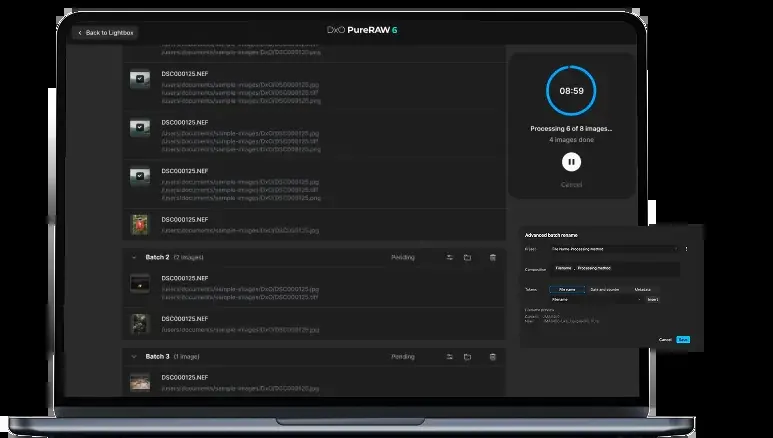
PureRAW can be launched from Lightroom or Photoshop, and batches of files can be processed together, with results returning to the catalog.
Preview and Comparison
A preview lets you check noise reduction at full size before running a batch.
Learning Curve and Support
There is almost nothing to learn. You add images, choose a processing method and a few correction options, and run it. The only decisions are which noise reduction level to use and whether to apply lens corrections. The vendor provides short guides, and the workflow is easy to explain to others. The real learning is about when to use it: on noisy or soft files that need rescue, rather than on every image from every shoot.
Pricing
DxO PureRAW is sold as a perpetual license with paid upgrades for major versions. Its price has typically been lower than PhotoLab, in the range of about one hundred to two hundred dollars.
A free trial is generally offered. Because pricing and upgrade terms change, check the vendor site for current pricing.
The lack of a subscription is appealing, but remember the cost of upgrades if you always want the newest engine.
Is It Good Value?
PureRAW offers a lot of image quality for its modest price, especially compared with buying a full second editor. The value shrinks if your main editor already includes comparable noise reduction. Consider the extra storage and the added step in your workflow. If you shoot in difficult light often, the improvement can be worth the effort. If not, you might prefer to wait and see whether your current editor improves its own tools.
Pros and Cons
What It Does Well
- Cleaner, sharper images than most built-in raw processing.
- Simple workflow with almost no learning curve.
- Output stays editable as raw-like DNG files.
- Works inside Lightroom and Photoshop.
- Perpetual license rather than subscription.
Where It Falls Short
- Not an editor, so you still need another program.
- Processing is slow without a strong graphics card.
- Output files are larger than the originals.
- Very limited manual control.
- Lens module coverage is not universal.
Bottom Line
DxO PureRAW is a simple, effective way to improve raw files with almost no learning. It will not replace your editor, and it adds an extra step and extra storage. But if you want cleaner results from the gear you already own, it is one of the most straightforward upgrades available. Run a trial on your worst files, and if the improvement is clear, it is likely to be worth the price. If you are unsure, start with a single recent shoot that includes both bright and dark scenes. Process the whole set, then compare a handful of frames side by side with the unprocessed versions. If the difference is only visible when you zoom far in, you may not need the tool. If you notice cleaner shadows and crisper edges at normal viewing sizes, it will earn its place. Either way, the trial lets you decide with evidence rather than marketing claims.
Who It Is For
PureRAW suits photographers who shoot in low light, use older lenses or want to extract every bit of quality from raw files, while keeping their current editor. It is popular with wildlife, event and travel shooters.
If your editor already provides satisfactory AI noise reduction, or you mostly shoot at low ISO, the gains may be modest. It also adds an extra step, which some photographers dislike.
Good technique remains the first priority. Review ISO explained and fast lenses to reduce reliance on noise reduction in the first place.
Getting Started
Install PureRAW and open a few high-ISO raw files. Choose the DeepPRIME option, leave lens corrections on and process the batch. Compare the results with the originals at full size in your editor. If you use Lightroom, try the plug-in route so processed files return to the catalog. Keep the originals for reference. After a week of use, decide whether to process every shoot or only difficult files, and set up a routine that fits your storage.
Before You Buy
Before committing to DxO PureRAW, run a short checklist. Confirm that your computer meets the system requirements, download the trial or free version if one exists, and test it on a real project from your own library rather than a demo file. Compare the exported result with what you get from your current tool, note how long each step takes, and check the vendor site for current pricing and upgrade terms. A program that suits the way you already work is worth more than one with a longer list of features.
Alternatives
Several approaches compete in the raw cleanup space.
| Alternative | Best Reason To Pick It |
|---|---|
| DxO PhotoLab | Full editor built on the same engine |
| Topaz Photo AI | Denoise, sharpen and upscale in one tool |
| Adobe Lightroom | Built-in AI denoise with a full workflow |
| Darktable | Free raw editor with denoise modules |
Process a handful of your noisiest files in each tool before deciding, because results vary by camera.
Common Questions
Is DxO PureRAW worth it?
If you shoot at high ISO or want better raw quality and already use another editor, it is a worthwhile and simple upgrade.
Is PureRAW an editor?
No. It prepares raw files for editing elsewhere and has almost no manual adjustment tools.
Does PureRAW work with Lightroom?
Yes. It can be launched from Lightroom and returns processed files to the catalog.
Is PureRAW different from PhotoLab?
PhotoLab is a complete editor, while PureRAW is a simple preprocessor that uses the same processing engine.
Try It Yourself
See what it can do on your own photos and footage.
Some links are affiliate links: if you buy through them we may earn a small commission at no extra cost to you. How this works.