
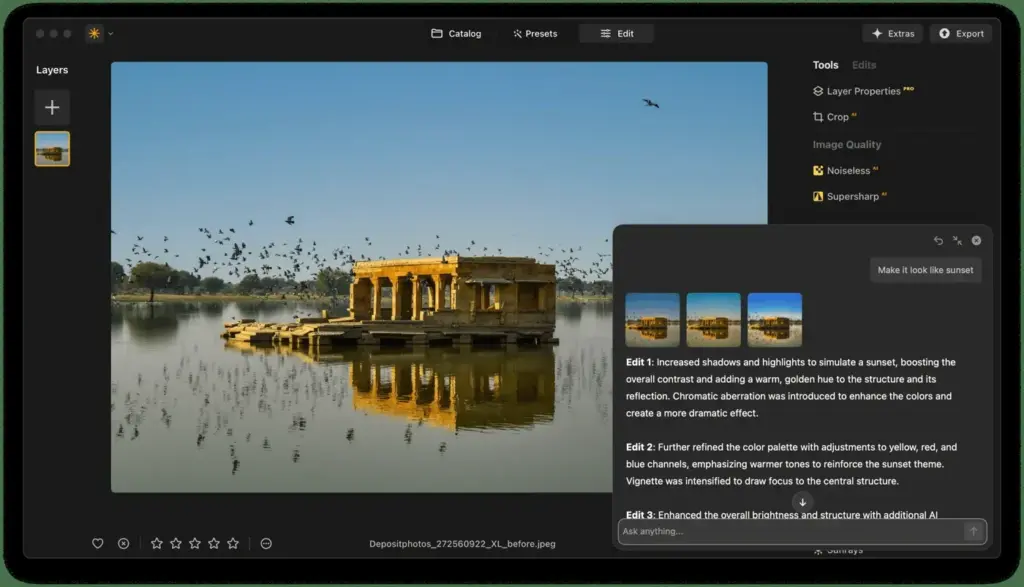
This luminar neo review finds a friendly, AI-driven editor that delivers quick, attractive results with sliders such as sky replacement and relighting. It suits casual photographers who want fast edits. Raw quality, organization tools and consistency trail dedicated editors, and some features rely on paid add-ons, so serious professionals may want more.
Verdict From This Luminar Neo Review
Luminar Neo is designed to make edits feel effortless. One-click relighting, sky replacement, portrait tools and enhancement sliders let you transform a photo in seconds, and the results are often striking.
It is less convincing as a foundation for a serious workflow. Raw rendering is not as refined as Lightroom or Capture One, library features are minimal, and aggressive AI sliders can produce an artificial look if overused.
As a quick creative editor or a plug-in alongside another program, it is fun and productive. As a one-stop solution for professionals, it falls short.
Performance and Reliability
Speed varies with hardware. On a recent computer with a good graphics card, adjustments update quickly and AI tools complete in seconds, but on older machines some effects can feel slow, and large raw files may lag. The program has improved with updates, though occasional bugs and crashes have been reported by users, so save your work. Memory use can be high when several AI tools are stacked. Running it as a plug-in inside another editor can add extra overhead, so close other heavy programs while you work.
Key Features
AI Enhancement Tools
Sliders for sky, structure, lighting and portraits do much of the work automatically. Use them lightly, since subtle edits look more natural. Understanding the exposure triangle helps you judge when AI is overcorrecting.
Sky Replacement and Relight
Swap a dull sky or add depth with relighting, a standout feature for landscapes. Good source images matter, so golden hour photography will give you better light to begin with.
Layers and Masks
Neo supports layers and masking so you can combine effects locally. The concept is similar to layer masks in Photoshop, with a simpler interface.
Portrait and Retouch Tools
Face, skin and body tools speed up portrait edits, though heavy use can look processed.
Extensions and Plug-In Mode
Extra tools such as noise reduction and upscaling are sold as extensions, and Neo can run inside Lightroom or Photoshop. Check which are included in your plan.
Learning Curve and Support
Luminar Neo is easy to start with. The workspace is organized by task, with panels for essentials, creative looks, portraits and professional tools, and each slider has a plain name. The company supplies tutorials and the community shares presets. The risk is that easy sliders hide what is happening, so you may not learn the underlying principles. To avoid that, try the manual tools such as curves and masks alongside the AI features, and compare results against your original.
Pricing
Luminar Neo has been offered as a subscription and as a lifetime license, and the company sells extension packs separately. Pricing has varied widely with frequent promotions.
Because bundles, extension prices and plan names change often, check the vendor site for current pricing. Compare the price of extras against what is included before purchasing.
A lifetime option appeals to people who dislike subscriptions, but confirm whether future major versions are included.
Is It Good Value?
Value depends on which model you choose and what extras you need. A lifetime license can be cost-effective if you stay with the base features, but extensions for upscaling, noise reduction and similar jobs can add up. Frequent sales make it difficult to judge the true price, so compare the total against what you would pay for a subscription to a different editor. If you mainly want quick, pleasing edits, the base package may be all you need.
Pros and Cons
What It Does Well
- Quick, striking edits with minimal effort.
- Clean, approachable interface suits newcomers.
- Layers and masks add local control.
- Can run as a plug-in for other editors.
- Lifetime license option is available.
Where It Falls Short
- Raw conversion quality trails professional converters.
- Library and organization tools are limited.
- Several useful tools are paid extensions.
- AI sliders can look artificial if pushed.
- Performance can lag on older computers.
Bottom Line
Luminar Neo is best viewed as a creative companion rather than a main workhorse. It makes quick, attractive edits easy and lets beginners get impressive results. Its weaknesses are in raw rendering, library management and consistency, which matter more as your needs grow. If you want fast edits and enjoy experimenting, it is a pleasant tool. If you need accuracy, workflow depth and predictable results, build around a dedicated editor and use Neo for the occasional creative boost.
Who It Is For
Luminar Neo suits hobbyists, travel photographers and social media creators who want attractive results fast without learning a complex program. It also works as a creative add-on for people already using Lightroom.
If you shoot professionally and need accurate color, large library management and batch workflows, a dedicated raw editor is a better base. Photographers who prefer to understand each edit may find the AI approach too opaque.
Improve results at capture. Learn composition and light first, and the AI will have better material to work with.
Getting Started
Open a photo, apply a modest enhancement and then check each AI tool individually. Try relighting with a low amount, and test sky replacement on an image with a clean horizon. Add a mask to limit an effect to part of the picture, and compare with the original using the before-and-after view. Save a preset when you land on a look you like. If you already use another editor, try Neo as a plug-in and see how it fits your workflow before changing anything.
Before You Buy
Before committing to Luminar Neo, run a short checklist. Confirm that your computer meets the system requirements, download the trial or free version if one exists, and test it on a real project from your own library rather than a demo file. Compare the exported result with what you get from your current tool, note how long each step takes, and check the vendor site for current pricing and upgrade terms. A program that suits the way you already work is worth more than one with a longer list of features.
Alternatives
Competing tools vary from free editors to full workflows.
| Alternative | Best Reason To Pick It |
|---|---|
| Adobe Lightroom | Stronger raw processing and organization |
| ON1 Photo RAW | Perpetual license with layers and AI tools |
| Affinity Photo | One-time purchase for detailed retouching |
| Topaz Photo AI | Specialist noise reduction and sharpening |
Luminar Neo works best as part of a toolkit rather than a total replacement for your main editor.
Common Questions
Is Luminar Neo good for beginners?
Yes. Its simple interface and AI tools give quick results without a steep learning curve.
Can Luminar Neo replace Lightroom?
Not fully. It lacks Lightroom organization and has less refined raw processing, but it works well as a creative editor.
Does Luminar Neo work as a plug-in?
Yes. It can run inside Lightroom and Photoshop as well as standalone.
Are extensions included?
Some are, some are sold separately. Check the plan details before you buy.
Try It Yourself
See what it can do on your own photos and footage.
Some links are affiliate links: if you buy through them we may earn a small commission at no extra cost to you. How this works.