
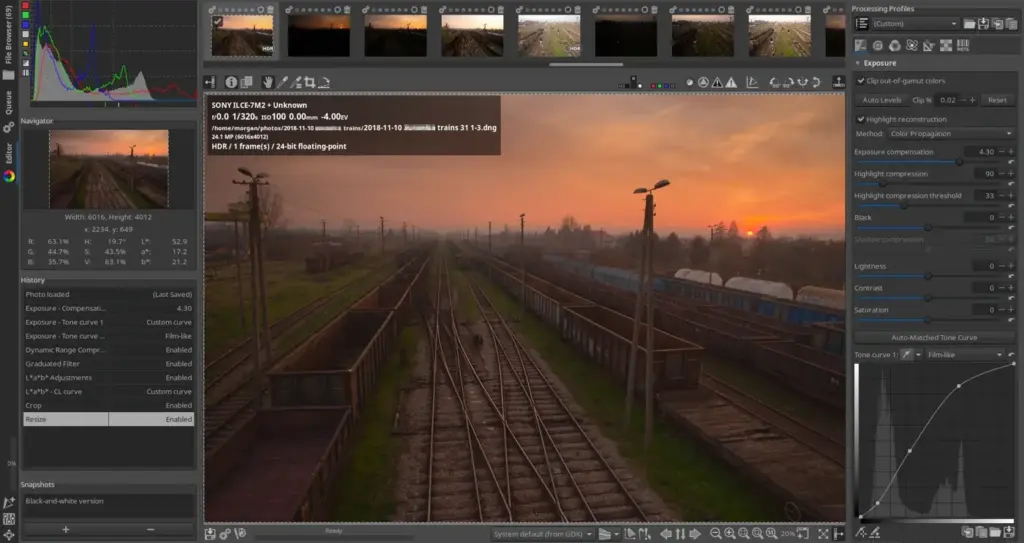
This rawtherapee review finds a free, open-source raw processor with excellent demosaicing, detailed color and tone controls and no cost. It rewards technical photographers who want control. Its interface is dated, its library features are minimal and some controls are confusing, so beginners may find it demanding.
Verdict From This Rawtherapee Review
RawTherapee is a raw processing program with a long history and a loyal following. It offers several demosaicing algorithms, detailed tone curves, color tools, noise reduction and batch processing, all without cost.
Its design emphasizes control over convenience. There is no full catalog, the layout feels technical and some tools expose many settings at once. That suits photographers who like to experiment but can frustrate people wanting quick edits.
Image quality can be excellent when you put in the work, and it is a solid free option alongside darktable.
Performance and Reliability
Speed is acceptable on modern hardware, though some operations, such as high-quality demosaicing or heavy noise reduction, can be slow. Large batches run through the queue in the background, which lets you keep working. Memory use grows with big files and complex edits. The program is generally stable. Choosing a faster demosaicing algorithm for previews and a higher-quality one for final export is a practical way to stay productive. Close other heavy programs before large batches, since memory pressure is the most common cause of slowdowns. Saving a few processing profiles for different camera and lighting situations means you can apply a good starting point instantly and then fine-tune only where needed.
Key Features
Demosaicing and Raw Processing
Multiple algorithms let you choose the best rendering for each camera and scene. Understanding raw vs JPEG helps you see why raw processing makes such a difference.
Tone and Color Controls
Curves, tone mapping and color adjustments provide deep control over contrast and color. For context on tonal range, see dynamic range.
Noise Reduction and Detail
Several noise reduction and sharpening tools address high-ISO images. See photon shot noise for the source of the grain.
Batch Processing and Profiles
A queue lets you apply processing profiles to many files, useful after large shoots.
Lens Corrections
Distortion, vignetting and chromatic aberration corrections use lens profiles. Learn the optical issues in lens aberrations.
Learning Curve and Support
The learning curve is steep because the interface exposes many technical controls with limited guidance. Official documentation and community guides explain the tools well, and the forum is active. Beginners benefit from starting with a few tools, such as exposure, tone curve and color, then adding noise reduction and sharpening. Saving processing profiles helps you build a consistent workflow as you learn. Many photographers find it useful to work through one tool at a time on a single image, noting how each slider changes the result. Reading the project guides on the tone curve and the color tools pays off, because those controls are where RawTherapee is strongest.
Pricing
RawTherapee is free and open source, with no paid edition and no subscription. Development depends on volunteers and community contributions.
There is nothing to buy, though a capable computer helps. Check the project site for the latest stable version and any nightly builds.
Because it has minimal library features, you may pair it with a separate organizer, which can add workflow complexity but not cost.
Is It Good Value?
Value is excellent because it costs nothing and delivers high-quality results. The cost is your time and the lack of integrated management features. If you already organize photos in another way, such as with folders or a separate manager, that matters less. For those who prefer all-in-one convenience, a commercial editor may be more efficient in the long run. If you already use a separate manager, you lose little by skipping a built-in catalog. Plenty of photographers pair it with simple folder structures and a free image viewer. For people who care about demosaicing quality on specific cameras, being able to switch algorithms at no cost is a real advantage.
Pros and Cons
What It Does Well
- Completely free with no limitations.
- Several high-quality demosaicing algorithms.
- Extensive control over tone, color and detail.
- Good batch processing for large shoots.
- Cross-platform, including Linux.
Where It Falls Short
- The interface looks dated and can be confusing.
- Minimal library and organization features.
- Steeper learning curve than commercial editors.
- Processing can be slower than competitors.
- Fewer ready-made presets and creative looks.
Bottom Line
RawTherapee is a capable free raw processor with serious image quality. It is not the easiest program to use, and it will not manage your library, but for technical photographers on a budget it is worth exploring. Try it beside darktable, pick the one that suits your thinking and learn it well. Keep your originals and your processing profiles together so you can reproduce any edit later. When you find settings that suit your camera, save them as a starting profile and refine from there, rather than starting from zero on every shoot. Before relying on any free tool for paid work, run a complete test project from import to final export, and confirm the output looks right on the screens and prints your clients will actually use. That habit catches color and sizing surprises early, and it costs only an hour.
Who It Is For
RawTherapee suits photographers who want free software with serious controls, as well as those who like exploring settings and process many files in batches.
If you want an integrated library, mobile access or one-click looks, a different program will serve you better.
Combine it with good shooting habits. Review ISO and fast lenses so you start with cleaner files.
Getting Started
Install the program and open a raw file from the file browser. Choose a demosaicing method, adjust exposure and white balance, and use a tone curve to shape contrast. Apply noise reduction to a high-ISO image and check at full size. Save the settings as a profile, then apply it to a small batch. Export JPEGs and compare them with the originals. Keep notes on settings that work for your camera.
Before You Buy
Before committing to RawTherapee, run a short checklist. Confirm that your computer meets the system requirements, download the trial or free version if one exists, and test it on a real project from your own library rather than a demo file. Compare the exported result with what you get from your current tool, note how long each step takes, and check the vendor site for current pricing and upgrade terms. A program that suits the way you already work is worth more than one with a longer list of features.
Alternatives
Free raw editors are few but capable.
| Alternative | Best Reason To Pick It |
|---|---|
| Darktable | Free raw editor with a library and modern workflow |
| Adobe Lightroom Classic | Polished library and ecosystem |
| DxO PhotoLab | Superb noise reduction with lens corrections |
| ON1 Photo RAW | All-in-one editor with a perpetual license |
Try both RawTherapee and darktable on the same raw files, since each renders slightly differently.
Common Questions
Is RawTherapee free?
Yes. It is free and open source with no paid version.
Is RawTherapee better than darktable?
They differ. RawTherapee focuses on raw processing control, while darktable adds a library and a different workflow.
Does RawTherapee have a library?
It has a file browser but not a full catalog with ratings and collections.
Can it process many files at once?
Yes. Its batch queue applies processing profiles to groups of images.
Try It Yourself
See what it can do on your own photos and footage.
Some links are affiliate links: if you buy through them we may earn a small commission at no extra cost to you. How this works.