
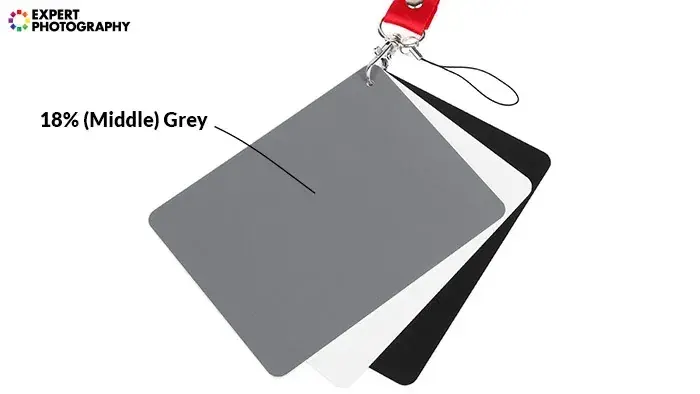
Middle gray is a tone that reflects about 18 percent of the light that falls on it, and it is the target your camera meter tries to reach. Because the meter assumes every scene averages out to this tone, bright subjects such as snow come out too dark and dark subjects come out too light unless you correct the exposure.
Why It Matters
Exposure mistakes in tricky light almost always trace back to the meter’s assumption. If you know that the camera is aiming for a gray average, you can predict when it will be wrong and fix it before you press the shutter.
Middle gray also appears in video and editing. Cinematographers place skin and gray cards at known levels, and colorists use it as the pivot point for contrast adjustments.
Beginner Middle Gray For Beginners
Imagine a photograph of the whole scene blended into a single color. The meter assumes that color is a medium gray, the same as a gray card from a camera store. It then sets shutter speed, aperture and ISO so that the average lands on that tone.
Why Scenes Fool The Meter
- Snow, sand and white walls are much brighter than average. The meter darkens them toward gray, so the picture looks dull and gray.
- A black cat on a dark rug is darker than average. The meter brightens it, so the picture looks washed out.
- A scene with a bright sky and dark ground may balance out, so the meter produces a result that suits neither.
How To Correct
- Take a test picture and look at the screen and histogram.
- If a bright scene looks gray, use exposure compensation of plus 1 to plus 2 stops.
- If a dark scene looks too light, use minus 1 to minus 2 stops.
- Take another picture and check again.
Starting Points
| Scene | Typical compensation |
|---|---|
| Fresh snow in full sun | Plus 1 to plus 2 stops |
| Bright beach and sand | Plus 1 stop |
| Average street or landscape | Zero |
| Black dog or dark clothes | Minus 1 stop |
| Stage with dark background and spotlight | Minus 1 to minus 2 stops |
Common Mistakes
- Trusting the rear screen brightness instead of the histogram, since the screen changes with ambient light.
- Applying plus compensation in Manual mode, where it does nothing unless auto ISO is on.
- Forgetting to reset compensation after leaving the snow.
- Metering off a very bright or dark object instead of an average tone.
A Gray Card Trick
A gray card is a neutral card that reflects 18 percent of the light. Place it in the same light as your subject, fill the frame with it, and meter. Set that exposure, and the card will record as middle gray. Take the card out and shoot your subject using the same settings. Gray cards are also useful for custom white balance.
Handy for this: Fast Prime Lens — creamy backgrounds, low light. (affiliate link)
Advanced How Middle Gray Is Defined, Encoded And Used In Practice
The Numbers
Middle gray at 18 percent reflectance means the surface reflects 18 percent of the light, in linear terms. Our eyes and image formats do not treat light linearly, so after gamma encoding, middle gray sits near 46 percent of the output scale, which is about value 118 out of 255 in sRGB. On the linear scale of a RAW file, 18 percent is about 2.5 stops below clipping, because a stop is a factor of two and the scene goes from 100 percent down to 18 percent in roughly 2.5 halvings. Understanding this is the basis of gamma and tone curves and dynamic range.
Meter Calibration Is Not Exactly 18 Percent
Reflected-light meters are calibrated by manufacturers according to a standard that actually falls closer to 12 to 14 percent reflectance, with some variation by brand. The 18 percent gray card is the convention photographers use because it produces results that look right in practice. A few cameras place the metered tone slightly lighter than 18 percent in JPEG to give a pleasing look. The difference rarely matters, but it explains why test results are not identical between systems. See metering modes compared.
Reflected And Incident Metering
A camera uses reflected metering, which measures light bouncing off the scene. An incident meter, held at the subject, measures light falling on it, so subject brightness does not affect the reading. This is why handheld incident meters give consistent results with snow and black cats. In camera, spot metering on a mid tone and locking exposure serves a similar purpose. See spot metering technique.
Middle Gray In Video And Log
Video cameras assign middle gray to specific signal levels. In Rec.709 it sits near 40 to 45 percent. In log formats it is placed according to the manufacturer, for example about 39 to 41 percent in several common curves. When you expose a log image, you can check a gray card on a waveform to confirm that it lands in the right place. The practice is covered in exposing log and video scopes.
Middle Gray And The Zone System
In the zone system, middle gray is Zone V, and each zone above or below is one stop. Metering a subject and placing it in a particular zone is a deliberate decision, such as putting skin at Zone VI or dark foliage at Zone III. For more, see zone system basics.
Editing And Pivot Points
In editing programs, contrast adjustments often pivot around middle gray, so tones above brighten and tones below darken. Knowing the pivot helps you understand why increasing contrast also shifts apparent brightness. In color grading, setting a pivot to match the exposure of your footage keeps the image from shifting while you adjust contrast.
Practical Workflow For Tricky Scenes
When light is difficult, use the meter as a starting point, then verify with the histogram and highlight warnings. A quick rule is to shoot, check the right edge of the histogram, and adjust exposure compensation by the number of stops needed to bring detail back from the edge. For a backlit scene, meter on the face or use spot metering with a plus 1 adjustment. For a bright snowy hillside, spot meter the snow and add 1.7 stops to place it near white. Keep a mental list of your most common corrections, and you will rarely need more than one test shot.
Try It
- Place a gray card, or a plain mid-gray object, in even light and fill the frame with it.
- Shoot in Manual mode using the camera meter at zero compensation, then check the histogram.
- Photograph a white sheet of paper the same way and notice it comes out gray.
- Apply plus 1.7 stops to the white paper shot and compare the results.
Common Questions
Is middle gray the same as 50 percent gray?
No. Middle gray reflects about 18 percent of light in linear terms, but looks like about 46 to 50 percent on a gamma-encoded screen. Photographers call it middle gray because it appears halfway between black and white to our eyes.
Why does snow look gray in my photos?
The meter assumes the scene averages to middle gray, so it darkens bright snow. Add plus 1 to plus 2 stops of exposure compensation so the snow records as white.
Do I need a gray card?
Not always. A gray card helps with consistency, color balance and video exposure. You can also meter off a mid tone such as grass or a gray road, but a card is more accurate.
Does middle gray matter when shooting RAW?
Yes. It tells you where the midtones sit in the file and helps you avoid clipping. Many photographers expose a little brighter than the meter suggests, keeping highlights safe. See exposing to the right.
Related Lessons
- Metering Modes Compared to learn how your camera averages the scene.
- Exposure Compensation Guide to correct the meter quickly.
- Reading Histograms to check results objectively.
- Zone System Basics for placing tones deliberately.
- Spot Metering Technique to measure a single tone accurately.
Gear That Helps With This
Hand-picked kit that makes this lesson easier to put into practice.
Some links are affiliate links: if you buy through them we may earn a small commission at no extra cost to you. How this works.