
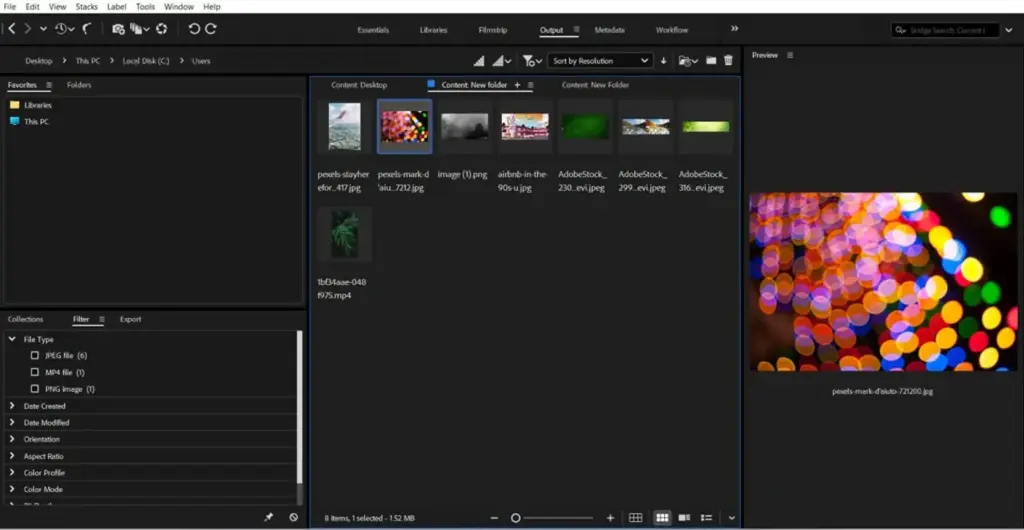
This adobe bridge review finds a free, flexible file browser that does asset management without a catalog. It previews raw files, applies ratings and metadata in bulk and opens images in Camera Raw or Photoshop. It is great for organizing folders, but slower and plainer than dedicated culling tools.
Verdict From This Adobe Bridge Review
Adobe Bridge is the quiet utility in the Adobe family. It does not edit anything itself. Instead it gives you a clean window onto your folders, with thumbnails, previews, ratings, labels and metadata, and then sends files to whichever Adobe program should open them.
Because it works on ordinary folders, there is no catalog to build, corrupt or migrate. You can point it at an external drive, a network share or a cloud folder and start working. That makes it a sensible home base for people who mix photos, video, graphics and documents.
It is not the fastest browser available, and large folders can feel sluggish while thumbnails build. Its best role is organizer and launching pad, rather than a high-speed culling engine for an event shooter.
Performance and Stability
Bridge caches thumbnails and previews, so a folder opens quickly the second time. The first visit to a large raw folder can take a while, and generating high-quality previews uses processor time. Keeping the cache on a fast drive helps, as does purging it occasionally. The program is generally stable, though very large collections and slow network drives can make it feel heavy. For quick triage, switching to lower quality thumbnails speeds things up considerably.
Key Features
Browsing and Previews
Workspaces such as Essentials, Filmstrip and Metadata let you arrange panels around the way you work. A loupe and full-screen review mode show the preview at a larger size, and a compare mode puts similar frames side by side. It handles raw, JPEG, PSD, video, PDF and vector files in the same view.
Ratings, Labels and Filters
Star ratings, color labels and keyword filters narrow a folder down to the shots you want. Collections gather images from several folders without moving them. The ideas are close to those in smart collections, though Bridge works on files in place instead of a database.
Metadata and Batch Rename
Bridge reads and writes standard metadata, so copyright, captions and keywords can be applied to many files at once through templates. The batch rename tool builds names from text, dates and sequence numbers, which supports a tidy file naming convention.
Camera Raw Hand-Off
Double-clicking a raw file opens it in Camera Raw, and edits are stored beside the image so they appear back in Bridge. You can copy settings from one photo and paste them to a whole selection, which is a handy way to sync a series shot in the same light.
Automation and Cloud Links
Batch tools can generate contact sheets, web galleries and PDF presentations, and scripts extend them further. Bridge also talks to Adobe libraries and cloud documents, and can send selected files straight to Photoshop, Illustrator or Premiere Pro.
Learning Curve
Bridge is easy to start with, because it behaves like a smarter file browser. Panels, workspaces and filters take a little longer to master, and the metadata templates are worth an hour of setup. Once you have saved a workspace that suits your routine, opening a new job takes seconds. Its connection to Camera Raw and Photoshop makes it feel natural to anyone already inside the Adobe ecosystem.
Real-World Workflow
A common routine is to copy files to a project folder, open it in Bridge, rate the keepers and filter to show only the stars. Selected images are sent to Camera Raw for toning, then batch renamed and tagged before delivery. Because everything stays in ordinary folders, archives remain readable by other software, and nothing is trapped in a proprietary library if you later change programs or share the drive with a colleague.
Updates and Support
Adobe updates the program alongside the rest of its applications, adding support for new camera files, formats and operating system versions. Help articles and community forums are extensive, and most problems have a documented fix. If thumbnails look wrong or the cache misbehaves, clearing it from the preferences usually restores normal behavior without touching your original files.
Working With Video and Design Files
Bridge is not only for photographers. Video clips show a scrubbable preview, PDFs can be paged through, and vector and layered files display with their embedded previews. Keywords and ratings apply to all of them in the same way, so a campaign folder holding photos, footage and layouts can be filtered as one set. That cross-format view is something many photo-only organizers cannot offer, and it is the main reason mixed-media teams keep it open all day.
Setup Tips
Set the cache location to a fast drive, choose a thumbnail quality that matches your patience, and save a custom workspace with the metadata panel visible. Enable the option to show only the files you care about, such as raw and JPEG, so folders full of sidecar and project files do not clutter the grid. A few minutes of setup makes the browser noticeably calmer, and the settings carry across every folder you open afterward.
Pricing
Adobe Bridge is offered free to anyone with an Adobe account, with no subscription needed just to browse and organize. The editing programs it launches, such as Photoshop and Camera Raw access through them, are the part that costs money.
Plans, bundles and account terms change, so check the vendor site for current pricing and downloads. Because the browser itself is free, it is very low risk to try, and it pairs well with an existing Creative Cloud plan.
Pros and Cons
What Works Well
- Free and works on ordinary folders
- No catalog to build or repair
- Handles photos, video, PDFs and design files together
- Batch metadata, rename and copy-settings tools
- Smooth hand-off to Camera Raw and Photoshop
What Holds It Back
- Slower than dedicated culling programs
- Thumbnail building lags on large folders
- Interface feels dated
- No editing of its own
Who It Is For
Bridge suits designers, photographers and video editors who already work in Adobe programs and want one neutral place to find, rate and tag files. It is especially handy for people who prefer folders over catalogs, or who work across several drives.
Event photographers who return with thousands of frames may find it too slow, and anyone who wants integrated editing and a searchable library will be better served by a catalog editor. A sensible approach is to use Bridge for first-pass browsing, then follow a 3-2-1 backup strategy once your selects are named and tagged.
Alternatives
Bridge sits between a basic file manager and a full catalog program.
| Alternative | Best Reason To Pick It |
|---|---|
| Photo Mechanic | Much faster ingest, culling and captioning |
| Adobe Lightroom Classic | Catalog, search and editing in one place |
| Capture One | Session based workflow with advanced raw editing |
| Windows File Explorer or Finder | Fine for simple browsing without extra software |
If speed is your main complaint, a dedicated culler is the upgrade. If search and editing matter most, move to a catalog program.
Common Questions
Is Adobe Bridge really free?
Yes, it is free with an Adobe account. The paid parts are the editing programs you launch from it.
Does Bridge need a catalog?
No. It reads your folders directly and stores thumbnails in a cache, not a database.
Can Bridge edit photos?
Not by itself. It opens files in Camera Raw, Photoshop or another editor you choose.
Is Bridge better than Lightroom for organizing?
It is simpler and folder based. Lightroom adds search, collections and editing, which many photographers prefer.
Try It Yourself
See what it can do on your own photos and footage.
Some links are affiliate links: if you buy through them we may earn a small commission at no extra cost to you. How this works.