
A file naming convention is a fixed pattern for naming photo and video files so they sort correctly, stay unique and are easy to find years later. A reliable pattern combines a date, a project or subject tag and a counter, with no spaces or special characters. Good file naming prevents duplicates and lost files.
Why It Matters
Cameras create names such as IMG_0001 and reset the counter, so two cards can produce files with the same name. Mix them in one folder and one may overwrite the other. Even without overwriting, a library of thousands of generic names is hard to search.
A clear naming scheme solves this. Files sort in the order you expect, backups match originals, and clients or collaborators can find a picture from its name alone. It is a small habit that saves hours later.
Beginner Building A Naming Pattern
What To Include
– The date in year, month, day order.
– A short project, client or location tag.
– A sequence number with leading zeros.
– Optional extras such as camera ID or version.
Example Pattern
2026-04-12_SmithWedding_0001.jpg is clear: date, project, counter. Sorting by name puts everything in the right order because the year comes first.
Simple Rules
1. Use year-month-day, so alphabetical order equals chronological order.
2. Use leading zeros, such as 0001, so 10 comes after 9.
3. Avoid spaces, and use underscores or hyphens.
4. Avoid special characters such as slashes, colons and symbols.
5. Keep names short enough to read but long enough to be unique.
Table Of Good And Bad Names
| Bad Name | Better Name |
| final photo 2.jpg | 2026-04-12_Beach_0002.jpg |
| IMG_0345.CR3 | 2026-04-12_Beach_0345.CR3 |
| clip1 new.mov | 2026-04-12_Interview_A001.mov |
Common Mistakes
– Using month-day-year, which sorts incorrectly.
– Renaming files in several programs without a plan.
– Adding words like final and new that lose meaning over time.
– Changing names after clients have already referenced them.
Handy for this: Camera Gimbal — smooth handheld footage. (affiliate link)
Advanced Applying A Naming Convention In A Real Workflow
Rename On Import Or Offload
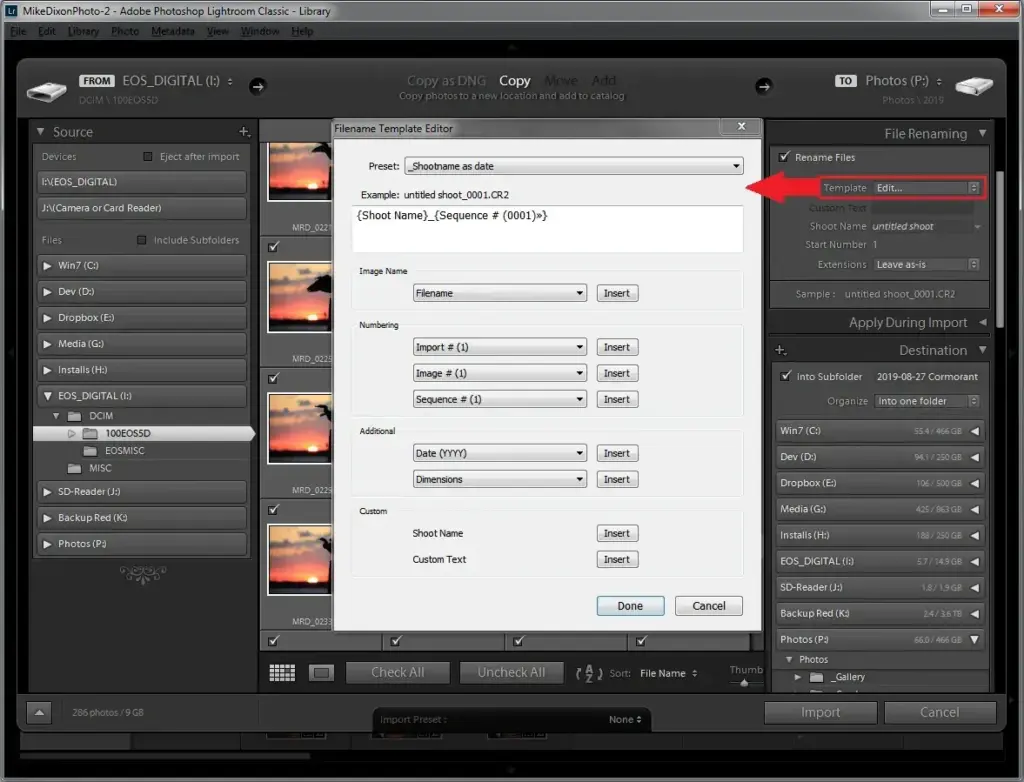
The best moment to rename is during import. Lightroom, Capture One and other software can rename files as they copy from the card. Set a template with date, project tag and counter, and apply it every time. See Lightroom catalog setup and card offload workflow for the surrounding steps. Renaming before editing keeps all references consistent, since sidecar files and catalogs follow the new names.
Keeping The Original Number
Some photographers keep the camera’s number inside the new name, so they can trace a file back to the card. Others use a fresh counter. Either choice works if you stay consistent. If you shoot with several cameras, add a short code, such as A and B, to separate them. For video, keep the clip name from the camera or recorder, and add the project and day.
Folders And Names Together
A name should work with a folder structure, not replace it. Use folders for year, event and camera, and names to identify each file. Read folder structure for photos for a folder plan that pairs well with a naming pattern. Do not repeat the same details in both so many times that the path becomes too long.
Batch Renaming
Tools for batch renaming include Lightroom, Bridge, Windows PowerToys, macOS Finder and free file managers. Always test on a copy first, and check that the sequence numbers and extensions are correct. Learn more about repeating tasks in batch processing.
Metadata And Copyright
File names are not a substitute for metadata. Add copyright, creator and contact information in the metadata, as covered in camera copyright metadata. Names are for people and sorting, while metadata helps search and ownership.
Backups
Consistent names make backups easier to verify, because the same file has the same name in every copy. Compare file counts and names between drives after each copy. See the 3-2-1 backup strategy for a complete plan, and use external SSD storage for fast working copies.
Exports And Versions
Exports need names too. Add a suffix for size or purpose, such as _web or _print, and a version number if needed. Never overwrite a delivered file with a new version of the same name without saying so.
Multi-Day And Multi-Person Projects
When several people shoot the same event, give each shooter a code and keep the counter separate. At the end of the day, copy everything into one project folder and check for duplicate names. A short guide shared with the team ensures everyone uses the same pattern from the start.
Special Characters And Systems
Some systems limit the length of names and paths. Keep names under about 60 characters, and avoid accents when files will move between systems. Do not use periods inside names other than before the extension. This prevents errors in older software, websites and cloud tools.
Summary
Choose one pattern, write it down, and use it everywhere. Date first, then project, then a numbered counter, with no spaces or special characters. Rename on import and verify during backup.
Naming Video Clips And Audio
Video and audio need extra care because recorders often create generic names such as C0001 or TRK1. Keep the original clip name inside your own name, then add the date, scene or interview subject and the camera letter. For example, 2026-04-12_Interview_A_C0001.mov tells you the day, shoot type, camera and original clip. Record separate audio with the same day and project tags, and match the take number so a sync tool or an editor can pair files quickly.
Handling Duplicates And Mistakes
If two files end up with the same name, never replace one with the other until you confirm they are identical. Compare size and date, and open both. If a name was applied wrongly in a batch, undo it at once while the original names are still known, or restore from a backup. Keep a text note with the pattern you used and the date you changed it, so a future you or a colleague can understand older files.
Naming For Delivery
Clients appreciate names that make sense outside your system. For delivery, drop internal codes and use the client name, a short description and a number. Add a version suffix such as v2 only when a revision truly replaces an earlier one, and keep the earlier file in a separate folder so nothing is lost.
Try It
- Write a pattern that fits your work, such as date, project and a four digit counter.
- Copy ten test files to a new folder and batch rename them with this pattern.
- Sort the folder by name and confirm the order matches the shooting order.
- Save the pattern as an import preset in your editing software.
Common Questions
What is the best file naming convention for photos?
A date in year-month-day order, a short project or subject tag and a counter with leading zeros, without spaces or special characters.
Should I keep the camera’s original file number?
It helps trace a file back to a card, so many photographers keep it inside the new name, but a fresh counter works if you stay consistent.
When should I rename files?
During import or card offload, before editing, so catalogs, sidecar files and backups all use the same names from the start.
Why avoid spaces in file names?
Spaces and special characters can cause problems in command lines, websites and some software, so underscores or hyphens are safer.
Related Lessons
- Folder Structure For Photos to organize where files live.
- Card Offload Workflow to rename while copying.
- Camera Copyright Metadata for ownership details in files.
- 3-2-1 Backup Strategy to keep names matched across copies.
- Batch Processing for renaming many files at once.
Gear That Helps With This
Hand-picked kit that makes this lesson easier to put into practice.
Some links are affiliate links: if you buy through them we may earn a small commission at no extra cost to you. How this works.