
This dxo photolab review finds a raw editor with some of the best noise reduction, lens corrections and local adjustment tools available. Its DeepPRIME denoising is superb and its control points are flexible. The library tools are basic, the interface is unusual, and it costs more than some rivals, so it suits quality-focused editors.
Verdict From This DxO Photolab Review
DxO PhotoLab puts image quality first. Camera and lens modules, built from lab measurements, correct distortion, vignetting and softness automatically, and its DeepPRIME noise reduction can rescue high-ISO files that other tools struggle with.
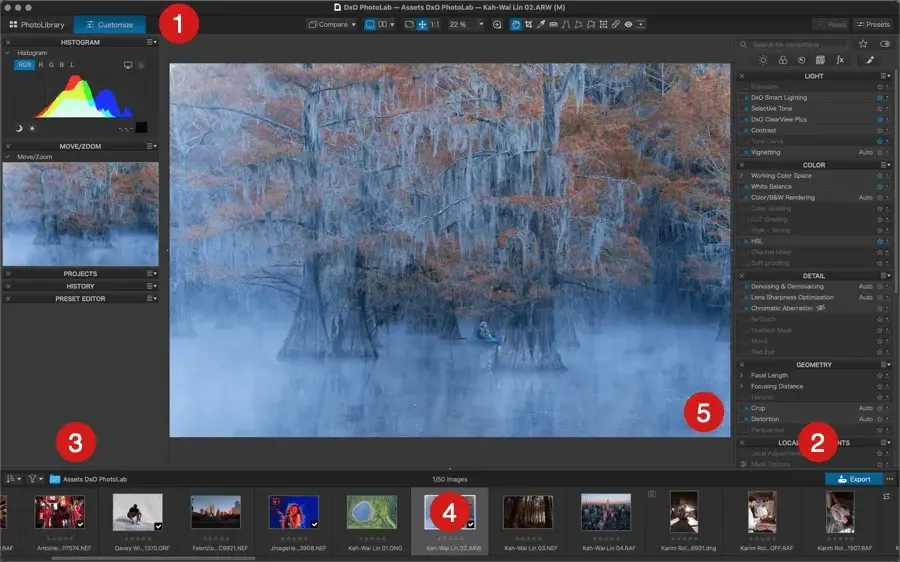
Editing controls are comprehensive, with local adjustments through control points and masks, a color wheel and strong contrast tools. The program feels more technical than some competitors, and you may spend time learning where things live.
It is weaker as a library manager. If you need a full catalog, ratings and collections, you may combine it with another program or choose a different editor.
Performance and Reliability
Most adjustments are quick, but DeepPRIME is demanding. On a recent graphics card, a raw file can process in a few seconds, while older systems may take considerably longer and previews can lag. Batch exporting a full wedding can run for an hour or more. The program is stable and consistent, and updates add support for new cameras. Disabling noise reduction while you edit and enabling it for export is a practical way to keep the interface responsive. Exporting to a smaller JPEG is quicker than producing a full-resolution TIFF, so consider your delivery needs before queuing a large batch. Keeping the cache on a fast drive also helps previews load smoothly, and closing other heavy programs frees memory for the noise reduction engine.
Key Features
DeepPRIME Noise Reduction
Machine learning removes noise while recovering detail, and the newer versions work during demosaicing for cleaner results. It makes high-ISO shooting more practical. To understand why noise happens, read photon shot noise.
Lens and Camera Corrections
Automatic corrections for distortion, vignetting, chromatic aberration and sharpness use measured profiles. Learn about the optical issues in lens aberrations and MTF charts.
Local Adjustments
Control points and masks let you change exposure, contrast and color in specific areas, with options to select by luminance or color. The workflow is different from other editors but very precise.
ClearView Plus and Contrast Tools
A dehazing and contrast tool improves local contrast without halos, handy for hazy landscapes. Pair it with knowledge of dynamic range.
Color Rendering and Presets
Color rendering profiles mimic specific camera and film styles, and presets help you build repeatable looks.
Learning Curve and Support
PhotoLab is not difficult, but it is different. Panels are named for specific technologies, and the local adjustment tools work differently from the brush-based approach most photographers know. The vendor offers tutorials and webinars, and there is an active community. Expect a week or two to feel comfortable. A smart route is to start with automatic corrections and DeepPRIME, then add local adjustments after you understand the basic workflow.
Pricing
DxO PhotoLab is sold as a perpetual license, with editions that differ in features and a paid upgrade for each major version. The standard edition has typically been in the low hundreds of dollars, with a higher edition for advanced tools.
A free trial is generally available. Because editions and upgrade terms change, check the vendor site for current pricing.
Perpetual licensing is attractive to photographers who dislike subscriptions, though upgrade fees add up if you always want the newest version.
Is It Good Value?
The one-time license is appealing, especially if you do not need every new version. Over several years it can cost less than a subscription. The value is highest if noise reduction and lens correction are central to your results. If your shooting is mostly in good light with modern lenses, the advantages are smaller. Consider the cost of upgrades and whether an alternative with built-in AI denoising would suffice.
Pros and Cons
What It Does Well
- DeepPRIME is among the best noise reduction available.
- Automatic corrections tuned to specific camera and lens combinations.
- Precise local adjustments with control points.
- Perpetual license rather than subscription.
- Clean, natural rendering of fine detail.
Where It Falls Short
- Library features are basic compared with Lightroom.
- The interface and terminology take time to learn.
- Noise reduction processing is slow on weaker hardware.
- Lens modules may not cover every lens.
- Upgrades cost extra each major version.
Bottom Line
DxO PhotoLab is an excellent choice if image quality is your priority. It will not replace a full library manager, but it can raise the quality of your files, especially in low light. The perpetual license and focused toolset make it appealing, and the trial makes it easy to test. If you often shoot at high ISO or use lenses that need correction, give it a serious look. Before committing, run the trial on a set of images that represent your real work, not just a few showpieces. Pay attention to how the program treats skin tones, foliage and fine texture at high ISO, since those are the places where noise reduction differences are easiest to see. Also test how it fits with your storage and backup habits, because a new editor changes where edited files and sidecar data live.
Who It Is For
PhotoLab suits photographers who care about technical image quality, especially those who shoot at high ISO, with older lenses or in challenging light. It is also a good option for people who want to avoid subscriptions.
If you manage tens of thousands of images and need ratings, keywords and smart collections, Lightroom Classic or a dedicated asset manager will serve you better.
It pairs well with a separate culling step. Learn the basics of raw files to get the most from its corrections.
Getting Started
Install the program, let it download the correct camera and lens modules and open a raw file from a high-ISO shoot. Apply DeepPRIME and compare at full size. Adjust exposure, white balance and contrast, then add a control point to brighten a subject. Try ClearView Plus on a hazy scene and check for halos. Export a JPEG for web and a TIFF for further work. If you use a catalog elsewhere, decide how to move images between programs.
Before You Buy
Before committing to DxO PhotoLab, run a short checklist. Confirm that your computer meets the system requirements, download the trial or free version if one exists, and test it on a real project from your own library rather than a demo file. Compare the exported result with what you get from your current tool, note how long each step takes, and check the vendor site for current pricing and upgrade terms. A program that suits the way you already work is worth more than one with a longer list of features.
Alternatives
Raw editors compete mostly on rendering, workflow and price.
| Alternative | Best Reason To Pick It |
|---|---|
| Adobe Lightroom Classic | Better library tools and a huge ecosystem |
| Capture One Pro | Superb color and tethering |
| DxO PureRAW | Cheaper, focused on raw preparation only |
| ON1 Photo RAW | Layers and AI tools in a perpetual license |
Many photographers use PhotoLab as a processing engine and finish in another editor.
Common Questions
Is DxO PhotoLab better than Lightroom?
For noise reduction and lens corrections it is often better. For library management and mobile syncing Lightroom wins.
Does DxO PhotoLab have a subscription?
No. It is sold as a perpetual license with paid upgrades for major versions.
Is DeepPRIME slow?
It can be, particularly on older computers. A modern graphics card speeds it up considerably.
Can I use PhotoLab as a plug-in?
Yes. It can work as a plug-in for some other editors, with limits depending on the version.
Try It Yourself
See what it can do on your own photos and footage.
Some links are affiliate links: if you buy through them we may earn a small commission at no extra cost to you. How this works.