
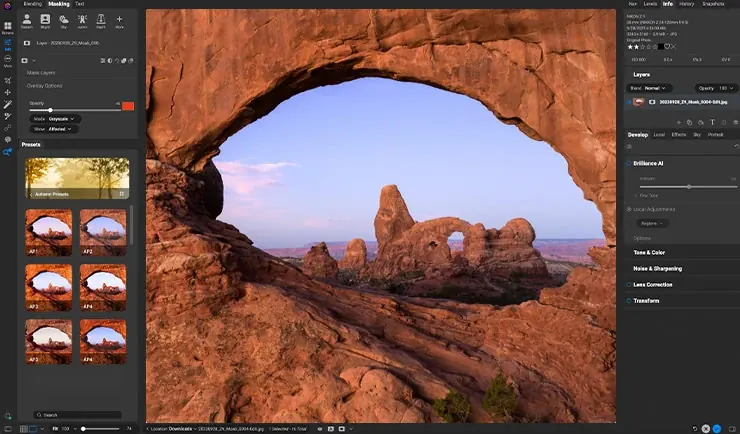
This on1 photo raw review finds an all-in-one editor that combines raw development, layers, local adjustments and AI tools in a single program, sold with a perpetual license option. It is versatile and fast to learn, but its raw rendering and library are less refined than the leaders. It suits hobbyists wanting one tool.
Verdict From This ON1 Photo Raw Review
ON1 Photo RAW tries to replace several programs at once. You can browse and rate photos, develop raw files, build layered composites, apply creative effects and run AI-based noise reduction and masking without leaving the application.
That breadth is the main attraction. Instead of juggling a raw editor and a pixel editor, you work in one place, which is convenient for hobbyists and anyone who dislikes moving files between programs.
The trade-off is polish. Individual tools are competent rather than class-leading, and the interface packs in many modules. It is a good value, though not the first choice for demanding professionals.
Performance and Reliability
Performance is acceptable on a modern computer but can slow when you apply many layers, heavy effects or AI tools to large raw files. Browsing large folders may take time while previews build, and the program benefits from fast storage and a decent graphics card. Updates have improved speed, although occasional bugs appear after major releases. Working at a lower preview size, building previews in advance and keeping the catalog on a fast drive all help keep the program responsive during longer editing sessions.
Key Features
Raw Development and Local Adjustments
The develop module offers exposure, color, tone and detail controls, plus masks that can be painted, gradient-based or generated by AI. Knowing the difference between raw and JPEG files helps you take advantage of the headroom raw gives you.
Layers and Compositing
Layers, blend options and masks let you combine images and apply effects non-destructively. The concepts match those in layer masks and blend modes.
AI Masking and Noise Reduction
AI tools select subjects, skies and backgrounds, and noise reduction handles high-ISO files reasonably well. For background on why noise appears, see ISO explained.
Effects, Presets and Looks
A large library of filters, borders, black and white tools and presets supports quick creative styling.
Plug-In and Standalone Modes
The program can run alone or as a plug-in for other editors, and its modules can also be bought separately in some editions.
Learning Curve and Support
Most people become productive quickly because the modules are clearly named and the presets give instant results. The vendor offers tutorials, and many independent photographers publish courses. The challenge is that the program includes a lot, so beginners can feel unsure where to start. A good approach is to stay in the develop module for a few weeks, then explore layers and effects once the basics feel natural.
Pricing
ON1 Photo RAW has been sold both as a perpetual license, usually with paid upgrades for each new version, and as a subscription that includes updates and extra services. Perpetual pricing has typically been in the low hundreds of dollars, and sales are frequent.
Because the vendor changes its offers regularly, check the vendor site for current pricing and what each option includes. A free trial is normally available.
If you avoid subscriptions, the perpetual route is a meaningful advantage over some competitors.
Is It Good Value?
If you would otherwise buy a raw editor and a pixel editor, one license can save money. The value is strongest during sales and for photographers who prefer owning software. It is weaker if you already pay for an Adobe plan, since you would duplicate tools. Consider whether the modest rendering differences matter for your work, and test the trial before spending.
Pros and Cons
What It Does Well
- Combines raw, layers and effects in one program.
- Perpetual license option with frequent discounts.
- AI masking speeds up local adjustments.
- Easy to learn for beginners.
- Can work as a plug-in for other editors.
Where It Falls Short
- Raw rendering and color are less refined than leading editors.
- Library and organization tools are basic.
- The interface can feel crowded.
- Performance can slow on large files or older hardware.
- Upgrades cost extra each year for perpetual owners.
Bottom Line
ON1 Photo RAW is a practical, affordable all-in-one editor with enough power for most hobbyists. It will not beat the best specialist tools in every area, but the combination of features and the perpetual license make it appealing. If you want fewer programs and lower costs, try it. If your work demands top-tier rendering, test it against the leaders first. A fair test is to edit the same five photos here and in your current editor, then compare the time spent and the final look. Notice how the AI masks handle hair, foliage and sky edges, and whether the noise reduction keeps fine detail. That short experiment will show whether the convenience of one program outweighs any difference in rendering.
Who It Is For
ON1 Photo RAW suits hobbyists, travel shooters and enthusiasts who want one affordable program that does most of what they need. It also appeals to people who dislike subscriptions.
Professionals who need top-tier color rendering, tethering or deep catalog management may prefer a specialized raw editor combined with a pixel editor.
Learn exposure basics first. Reading dynamic range will help you judge how far you can push shadows and highlights.
Getting Started
Import a folder of raw files and let previews build. Open one in the develop module and adjust exposure, color and contrast. Use an AI mask to brighten a subject, then apply noise reduction if the photo was taken at high ISO. Try a layer to add a texture or sky replacement. Export a JPEG for sharing and compare it with the original. Keep your originals untouched, and save a few presets for looks you like so you can repeat them.
Before You Buy
Before committing to ON1 Photo RAW, run a short checklist. Confirm that your computer meets the system requirements, download the trial or free version if one exists, and test it on a real project from your own library rather than a demo file. Compare the exported result with what you get from your current tool, note how long each step takes, and check the vendor site for current pricing and upgrade terms. A program that suits the way you already work is worth more than one with a longer list of features.
Alternatives
Several programs overlap with ON1 Photo RAW.
| Alternative | Best Reason To Pick It |
|---|---|
| Adobe Lightroom Classic | Stronger library and a huge ecosystem |
| Affinity Photo | Cheaper pixel editor with strong layers |
| DxO PhotoLab | Better noise reduction and lens corrections |
| Luminar Neo | AI-driven creative editing |
Use the trial on your own raw files to judge rendering, since that is where editors differ most.
Common Questions
Is ON1 Photo RAW good for beginners?
Yes. Its single-program design and presets make it easy to start, though the number of modules can feel busy.
Does ON1 Photo RAW have a subscription?
It has offered both a perpetual license and a subscription. Check the vendor site for current terms.
Can ON1 replace Lightroom and Photoshop?
For many hobbyists yes, but professionals may miss refined raw rendering, library depth and advanced retouching.
Does it work as a plug-in?
Yes. It can be used as a plug-in for some other editors.
Try It Yourself
See what it can do on your own photos and footage.
Some links are affiliate links: if you buy through them we may earn a small commission at no extra cost to you. How this works.