
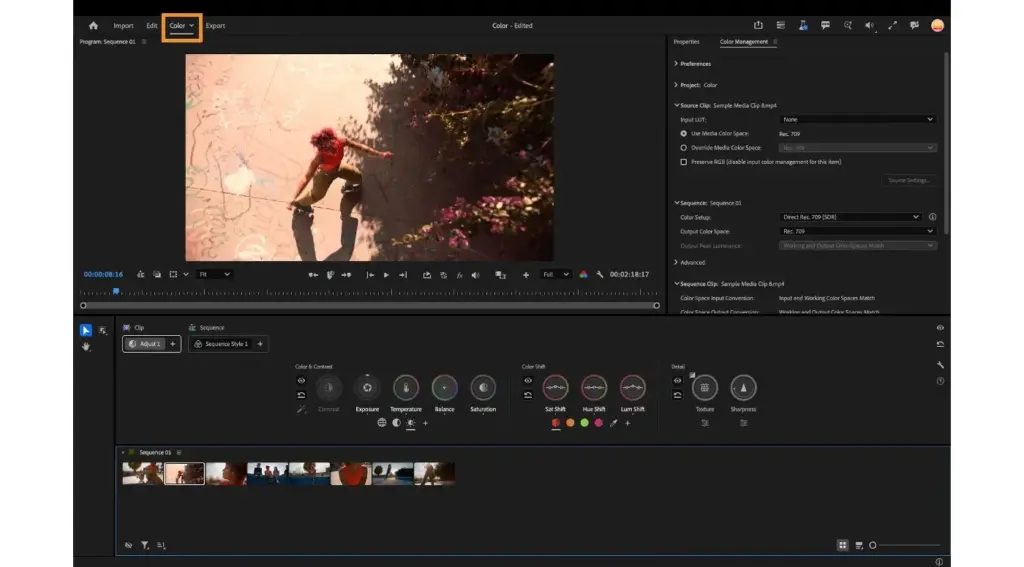
This adobe premiere pro review rates it as a flexible, industry-standard editor with excellent integration, strong audio tools and dependable collaboration features. It handles almost any camera format and fits long projects well. The ongoing subscription and occasional stability quirks are its weaknesses, and DaVinci Resolve is a serious free rival.
Verdict From This Adobe Premiere Pro Review
Premiere Pro is the editor many newsrooms, agencies and YouTube channels build their work around. Its timeline is quick to learn, deeply customizable and well supported by third-party plug-ins and templates. If you work with other editors or move projects between programs, its ubiquity is a practical advantage.
It is not perfect. Large projects can slow down, updates occasionally break habits, and the subscription is a permanent expense. DaVinci Resolve offers an excellent free tier and stronger color grading, while Final Cut Pro is faster on Macs.
Even so, the combination of solid editing, audio tools, captions and Adobe integration keeps it near the top of the list for most video work.
Performance and Reliability
Performance varies widely with hardware and footage. Highly compressed formats from cameras and phones are demanding to edit, and the program works best with a recent graphics card, plenty of memory and fast storage. Proxy workflows create lightweight copies for smooth editing while keeping full quality for export. Hardware acceleration speeds up playback and exports considerably on supported systems. Stability has improved over time, but large projects with many effects can still crash, so enable autosave and keep project backups. Closing unused panels and clearing the media cache also helps.
Key Features
Timeline and Trim Tools
The multi-track timeline supports ripple, roll, slip and slide edits, and nearly every action can be assigned a shortcut. Start with the Premiere timeline basics and the trim tools.
Multicam and Nested Sequences
Syncing multiple cameras by audio and cutting between angles live is a standout feature for interviews and events. See multicam editing in Premiere and nested sequences.
Captions and Text-Based Editing
Speech-to-text creates captions in a few clicks, and you can edit video by editing a transcript. The lesson on Premiere captions covers the workflow.
Color and Keyframing
Lumetri panels offer curves, wheels and LUT support, and keyframes control position, scale and effects. Read Lumetri color basics and keyframes in Premiere.
Speed Ramping and Project Setup
Smooth speed changes, optical flow and proxy workflows keep heavy footage manageable. Good project setup prevents trouble later, and speed ramping is worth learning early.
Learning Curve and Support
There is no shortage of learning material. Adobe provides in-app tutorials, and a huge community of creators offers courses on every technique. The workspace is flexible, so you can switch between editing, color, audio and graphics layouts. Beginners often struggle with project settings, media management and the many panels, but the basic cut-and-trim workflow is easy to pick up. Learning keyboard shortcuts early gives the biggest speed gain. Plan on a few weeks to feel competent and a few months to feel fast.
Pricing
Premiere Pro is available by subscription, either as a single app or within the full Creative Cloud collection. Single-app pricing has typically been around $20 to $35 a month depending on the term and region.
A free trial is normally offered, and students often receive a discount. There is no perpetual license, and plans change over time, so check the vendor site for current pricing.
If you also use After Effects, Photoshop and Audition, the full collection can cost less than buying several single-app plans.
Is It Good Value?
For working editors, Premiere Pro is hard to avoid because clients and collaborators expect Adobe project files. The subscription includes frequent updates, cloud features and access to stock and fonts, which adds practical value. For hobbyists, the cost is harder to justify when DaVinci Resolve offers a free version and Final Cut Pro is a one-time purchase on Macs. Consider how much video you will edit each month. If it is weekly, the subscription pays off. If it is occasional, pick a cheaper tool.
Pros and Cons
What It Does Well
- Fast, customizable timeline suits long-form and short-form editing.
- Opens nearly any camera or codec, including raw formats.
- Works smoothly with After Effects, Audition and Photoshop.
- Captions, transcripts and auto-reframe save significant time.
- Large ecosystem of templates, plug-ins and tutorials.
Where It Falls Short
- Subscription cost continues indefinitely.
- Complex projects can slow down or crash on modest hardware.
- Color grading is less powerful than in DaVinci Resolve.
- Updates can change behavior and interrupt workflows.
- The interface can feel crowded for beginners.
Bottom Line
Premiere Pro earns its reputation through reliability in professional settings, a huge talent pool of editors who already know it and a steady stream of useful features. It does not win every comparison, since Resolve is stronger for color and Final Cut Pro is leaner on a Mac. But as a general-purpose editor that plays well with other tools, it is difficult to fault. If you need a safe, flexible choice for client work, it deserves a place on your shortlist, and the trial costs nothing to try.
Who It Is For
Premiere Pro suits freelance editors, small studios, YouTubers and students who expect to collaborate or move into professional work. It also suits anyone who already pays for Creative Cloud.
Beginners who only need simple cuts could be happier with a lighter program. If you mainly shoot with a Mac and want a one-time purchase, Final Cut Pro is a strong rival. If color is the priority, try DaVinci Resolve.
Plan your frame rate and settings before cutting. The guide on video frame rates explains the choices that matter.
Getting Started
Create a new project and set the sequence to match your footage, using the frame rate and resolution of your camera. Import clips, drag them to the timeline and practice trimming with ripple and roll edits. Add titles, a basic color adjustment and background music, then export with a preset for your target platform. Organize bins from the start and name them clearly. Learn the shortcuts for cut, ripple delete and zoom first. Save your project often and keep a backup of the project file and media on a separate drive.
Before You Buy
Before committing to Adobe Premiere Pro, run a short checklist. Confirm that your computer meets the system requirements, download the trial or free version if one exists, and test it on a real project from your own library rather than a demo file. Compare the exported result with what you get from your current tool, note how long each step takes, and check the vendor site for current pricing and upgrade terms. A program that suits the way you already work is worth more than one with a longer list of features.
Alternatives
Premiere Pro has stiff competition at every price level.
| Alternative | Best Reason To Pick It |
|---|---|
| DaVinci Resolve | Free tier, best-in-class color grading |
| Final Cut Pro | Fast on Macs with a one-time purchase |
| Wondershare Filmora | Easier for beginners with built-in effects |
| Lightworks | Traditional editing feel with a free tier |
Test two or three of these on a real project, because the best editor is usually the one whose timeline feels natural to you.
Common Questions
Is Premiere Pro good for beginners?
It is learnable, but the number of panels and options can overwhelm new editors. Simpler programs may be a gentler start.
Is Premiere Pro better than DaVinci Resolve?
They have different strengths. Premiere is stronger for Adobe workflows and quick editing, while Resolve leads in color grading and has a free version.
Can Premiere Pro edit 4K and raw footage?
Yes. It supports 4K and many raw formats, and proxy workflows help on weaker computers.
Does Premiere Pro include After Effects?
No. They are separate apps, though both come in the Creative Cloud collection and share projects through dynamic links.
Try It Yourself
See what it can do on your own photos and footage.
Some links are affiliate links: if you buy through them we may earn a small commission at no extra cost to you. How this works.