
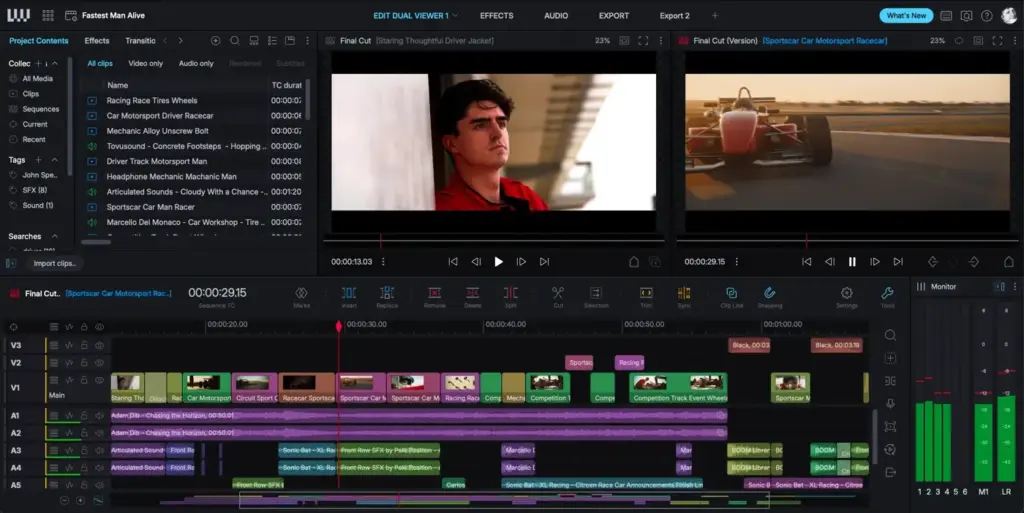
This lightworks review finds a veteran professional video editor with a fast, film-style timeline and a free tier. It offers precise trimming, real-time effects, multicam and broad format support. It suits editors who value speed and precision, though its interface has a learning curve and the free version limits export.
Verdict From This Lightworks Review
Lightworks has a long history in feature film editing, and that heritage shows in its design. The timeline is fast and precise, trimming is a strength, and the program rewards editors who like to work from the keyboard.
It offers a free tier that covers editing and basic export, which makes it an attractive way to learn professional editing without paying. Paid plans add higher export quality, more formats and additional tools.
The downside is that its interface and terminology differ from other mainstream editors. People coming from Premiere Pro or Final Cut may find it unfamiliar at first, and some modern conveniences, such as built-in motion graphics, are lighter than in larger suites.
Performance and Stability
Lightworks is generally quick, with responsive scrubbing and real-time effects on a reasonably modern computer. It handles a range of codecs, though some formats may need transcoding for smooth playback, a topic covered in video codecs. Large projects remain manageable and the program is stable in everyday use. Hardware acceleration is supported, and a fast drive helps with high-bitrate footage. As with any editor, working with proxies keeps heavy 4K projects smooth on modest computers.
Key Features
Timeline and Trimming
The timeline allows fast, accurate cutting with a strong set of trim tools, including ripple, roll and slip. If you are comparing workflows, Premiere trim tools and Premiere timeline basics explain the same concepts in another editor.
Real-Time Effects and Color
Effects, transitions and basic color correction run in real time, and a lookup table can be applied for quick looks as in LUTs explained. Color tools are practical but less extensive than a dedicated grading suite such as the one in Resolve color nodes.
Multicam and Project Sharing
Multicam editing lets you cut between synchronized angles live, similar to Premiere multicam. Project sharing options on paid tiers support team workflows, though many solo editors will not need them.
Format and Export Support
The program supports a wide range of camera formats and delivers to common web and broadcast formats. Frame rate handling is flexible, and understanding video frame rates helps you set up projects correctly. Higher quality export and certain codecs depend on the plan.
Audio and Titles
Audio editing handles levels, keyframes and basic effects, with enough tools for dialogue and music. Titles are functional rather than flashy. For complex sound or motion graphics, most editors pair it with other software.
Learning Curve
Lightworks takes longer to learn than a drag-and-drop editor, mainly because of its own workspace layout and terminology. Once the concepts click, many editors enjoy its speed and the clarity of its trim controls. Built-in tutorials and an active community help, and starting with a small project is the best way to settle in before a deadline.
Where It Falls Short
Motion graphics, advanced color and audio finishing are not its focus. Cloud collaboration, templates and automatic features such as captions are lighter than in some competitors. The free version imposes export limits, so some users hit a wall once they need higher quality output.
Free Versus Paid
The free tier is a genuine editor, not a crippled demo, and it is a good option for learning or simple projects. Paid plans suit people delivering at higher resolutions or needing more formats. Compare the limits against your real delivery needs, perhaps starting with the free version and upgrading only when a specific limit blocks you.
Compared With DaVinci Resolve
Resolve also has a powerful free version with editing, color and audio in one program, as described in Resolve free versus Studio. Resolve offers far more built-in tools, while Lightworks offers a lean, fast editing focus. Try both on the same short project to see which timeline suits your hands.
Practical Tips For New Users
Take a short tutorial before starting a real project, then learn a small set of keyboard shortcuts for cutting, trimming and marking. Organize footage into clear bins from the start, and set the project frame rate to match your main camera. Export a short test clip early to confirm the free tier limits suit your delivery. A little preparation avoids surprises late in a project, when deadlines are closest and changes are most stressful.
Platforms and Hardware
Lightworks runs on Windows, macOS and Linux, which is unusual among professional editors and useful for mixed studios. A multi-core processor, a modern graphics card and a fast solid state drive make for the best experience. Editing from a slow external drive can cause dropped frames, so keep active projects on quick storage and archive finished work elsewhere.
Final Thoughts
Lightworks is a focused editor that rewards patience. If you value a quick timeline and precise trimming more than built-in effects and templates, it is easy to recommend. If you want everything in one place, a larger suite will feel more comfortable from the first day. Download the free tier, cut one real project from import to export, and let that experience decide, since an editor is only right if it feels natural under deadline pressure and does not fight you when time is short.
Pricing
Lightworks offers a free tier with core editing and limited export options, plus paid plans that remove those limits and add features. Plans have been offered as subscriptions, annual payments and in some periods as a one-time purchase.
Because the options and prices have changed over time, check the vendor site for current pricing. Start with the free tier, cut a real project, and only pay if you need the extra export quality or formats.
Pros and Cons
What Works Well
- Fast, precise timeline and strong trim tools
- Genuinely useful free tier
- Real-time effects and multicam
- Wide format support
- Proven in professional film editing
What Holds It Back
- Unfamiliar interface for many editors
- Free tier limits export
- Light on motion graphics and color depth
- Smaller community than the big editors
Who It Is For
It suits editors who value speed and precision, students learning professional editing on a budget, and filmmakers who cut dialogue-driven material. Keyboard-minded editors tend to appreciate it most.
It is a weaker fit for people who want built-in motion graphics, advanced grading or a huge library of tutorials and templates. Those users will usually prefer a larger suite. Whichever editor you choose, learn the basics of shooting and exporting first, such as conforming frame rates, so your project settings match your footage and your delivery target.
Alternatives
Several editors compete for the same audience.
| Alternative | Best Reason To Pick It |
|---|---|
| DaVinci Resolve | Free tier with editing, color and audio in one program |
| Adobe Premiere Pro | Industry standard with deep Adobe integration |
| Final Cut Pro | Fast, Mac-only editing with a magnetic timeline |
| Filmora | Beginner-friendly editor with templates and effects |
If you like a lean and fast editor, give Lightworks a trial. If you want an all-in-one suite, Resolve is the stronger free rival.
Common Questions
Is Lightworks free?
There is a free tier with core editing and limited export. Paid plans unlock more features and output options.
Is Lightworks good for beginners?
It can be, but its interface and terminology differ from other editors, so expect a learning curve.
Can Lightworks edit 4K video?
Yes, with a capable computer. Proxies help keep playback smooth on modest hardware.
Is Lightworks better than DaVinci Resolve?
They suit different tastes. Lightworks is a lean, fast editor, while Resolve is a larger all-in-one suite.
Try It Yourself
See what it can do on your own photos and footage.
Some links are affiliate links: if you buy through them we may earn a small commission at no extra cost to you. How this works.