
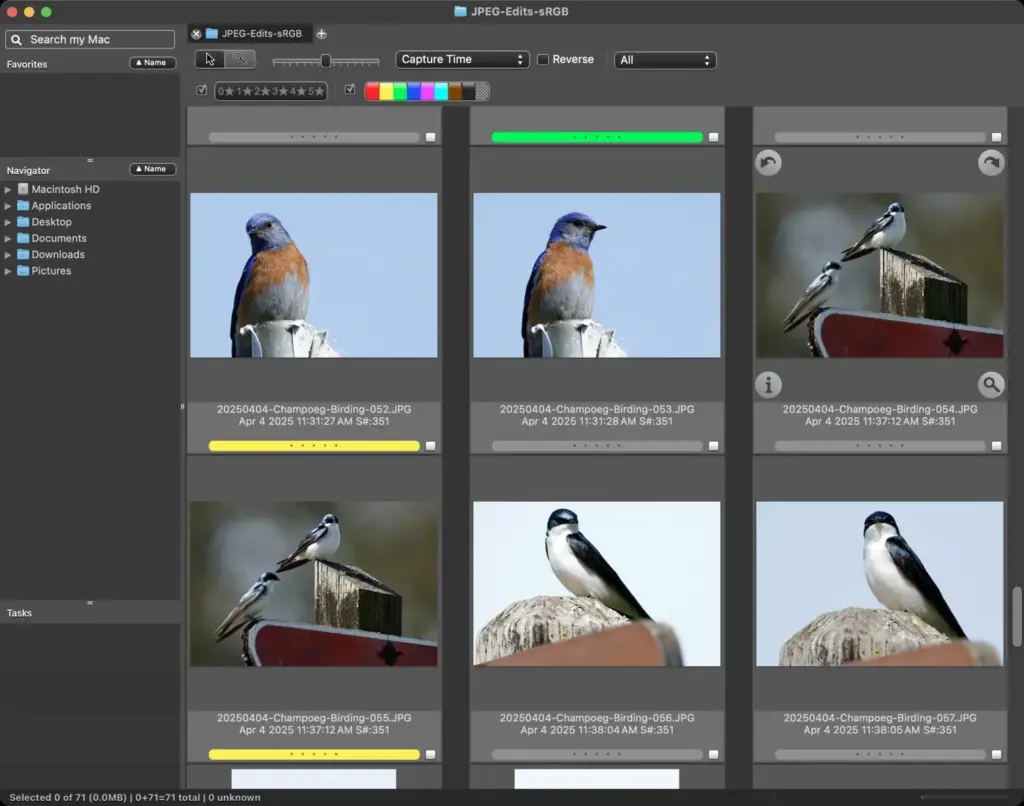
This photo mechanic review finds it the fastest way to ingest, cull and caption large shoots. It reads raw previews instantly, applies metadata in bulk and hands finished selects to your editor. It is built for sports, news and event photographers, and is less appealing if you want editing tools inside the same program.
Verdict From This Photo Mechanic Review
Photo Mechanic is not an editor. It is a very fast contact sheet and metadata engine, and that narrow focus is exactly why professionals keep it installed. When a card holds several thousand frames, it shows full-screen previews almost as quickly as you can press the arrow key, while catalog programs are still building thumbnails.
The program does three jobs well: copying files off the card with sensible names and folders, letting you star, tag and color-code the keepers, and writing captions and keywords so images can be delivered to an editor or agency. Everything after that, such as toning and retouching, happens somewhere else.
The interface looks dated, and some dialogs take a little time to understand. In return you get a tool that rarely crashes, never forces you into a catalog, and works directly on folders. For many news and sports shooters it is the first program opened after every assignment.
Speed and Reliability
Speed comes from reading the preview embedded in each raw file rather than rendering the raw data. That means you see the camera preview, not a fresh conversion, so judge critical sharpness with care. Ingest is dependable, with verification options that confirm each copy matches the original before you format the card. Folders with tens of thousands of images remain responsive, and the app keeps modest demands on memory. Slowdowns appear mostly when working on slow network drives. A fast card reader and a solid state drive make the program feel instant.
Key Features
Ingest and Naming
The ingest tool copies from one or more cards at once, renames files using tokens such as date, sequence and camera, and can write a second backup copy during the same pass. A clear naming scheme saves hours later, and the lesson on a file naming convention is a useful companion. Metadata templates can be stamped on every image as it arrives, so copyright and contact details are never forgotten.
Contact Sheets and Culling
Thumbnail grids, side-by-side comparison and a full-screen loupe make it easy to sort a day of shooting into rejects and selects. Star ratings, color labels and tags are keyboard driven, so the hands never leave the keys. If you are used to catalog culling as described in culling photos in Lightroom, expect a faster but plainer experience.
IPTC Captioning and Keywords
Photo Mechanic is famous for its caption tools. Variables pull in details from the file or a spreadsheet, so a roster of names can be matched to jersey numbers or bib numbers automatically. Keyword lists, code replacements and find-and-replace across selected images turn captioning from a chore into a quick pass. Standard IPTC fields are fully supported.
Batch Actions and Delivery
Selected images can be renamed, resized, watermarked and sent by upload in one operation. Transfer options cover FTP style destinations used by newsrooms and agencies. Export presets keep delivery consistent, which matters when several photographers feed one desk at a deadline.
Hand-Off To Other Editors
Because it writes standard sidecar and embedded metadata, ratings and keywords travel with the files into your raw editor. Many users cull here and then open only the keepers in a catalog program, which keeps libraries small. Setting up the destination is covered in Lightroom catalog setup.
Learning Curve
The basic workflow is quick to pick up: ingest, browse, rate, caption and export. The depth is in the details, such as variable codes, code replacement lists and template tokens. Expect an afternoon to feel comfortable and a few shoots to build your own presets. Once those presets exist, repeat jobs such as a weekly match or a school photo day run almost on autopilot, because the same naming, metadata and delivery settings are reused every time.
Real-World Workflow
A typical session starts by ingesting both cards with a backup copy, then culling in a single pass using star ratings. A second pass applies captions and keywords to the selects, and a final batch step exports resized copies for the client or sends full files to your editor. Because nothing is imported into a database, a folder can be handed to a colleague or moved to another computer without losing the work you have done on it.
Support and Updates
Camera Bits maintains the program with regular updates that add support for new cameras and file types, and it has a long record of listening to working photographers. Documentation is thorough, and an active user community shares templates and code replacement lists. Before a big assignment, confirm that your camera model is supported and that your version is current, so there are no surprises at the worst possible moment.
Pricing
Photo Mechanic is sold as a paid license from Camera Bits, with a longer-standing option to pay once for a version and a newer subscription arrangement. The exact tiers, upgrade fees and any bundled catalog product change from time to time, so check the vendor site for current pricing before you commit.
A free trial is normally offered, which is the best way to judge whether the speed justifies the cost. For anyone shooting for money, a single saved hour on a busy weekend usually covers the license quickly. Hobbyists who shoot a few hundred frames at a time will find the price harder to justify.
Pros and Cons
What Works Well
- Previews appear almost instantly, even on huge shoots
- Powerful caption, keyword and variable tools
- No catalog required, it works on plain folders
- Verified ingest with a second backup copy
- Reliable and light on memory
What Holds It Back
- No real editing or raw conversion
- Dated interface with a learning curve
- Previews are camera previews, not true raw renders
- Costly for casual shooters
Who It Is For
It suits photographers who return from an event with thousands of frames and a deadline: sports, news, weddings, concerts and school photography. Anyone who needs consistent captions or who delivers to an agency will use its metadata tools every day.
It is a poor match for someone who wants one program for organizing and editing. Beginners with a few hundred images per outing can cull inside a catalog editor without noticing much delay. Before buying, run a trial on a real shoot, time your current culling pass, and compare it. A good habit when working this fast is to keep a 3-2-1 backup strategy in place so the first copy is never the only copy.
Alternatives
Several programs overlap with parts of Photo Mechanic, though few match its speed.
| Alternative | Best Reason To Pick It |
|---|---|
| Adobe Bridge | Free for Adobe subscribers and good for browsing and batch metadata |
| Adobe Lightroom Classic | Culling, editing and cataloging in a single program |
| Capture One | Strong session workflow with tethering and editing |
| FastRawViewer | Very quick raw viewing when you only need to judge shots |
If you already own a catalog editor, try its culling mode on your next job before adding another purchase.
Common Questions
Is Photo Mechanic worth it?
It is worth it for high-volume shooters who deliver quickly or caption heavily. For occasional use, a catalog editor will probably be enough.
Does Photo Mechanic edit photos?
No. It sorts, tags, renames and delivers files, while toning and retouching happen in another program.
Does it need a catalog?
No. It reads folders directly, so there is no import step and no database to maintain.
Can it replace Lightroom?
Only for the culling and metadata stage. Most people use it before an editor rather than instead of one.
Try It Yourself
See what it can do on your own photos and footage.
Some links are affiliate links: if you buy through them we may earn a small commission at no extra cost to you. How this works.