
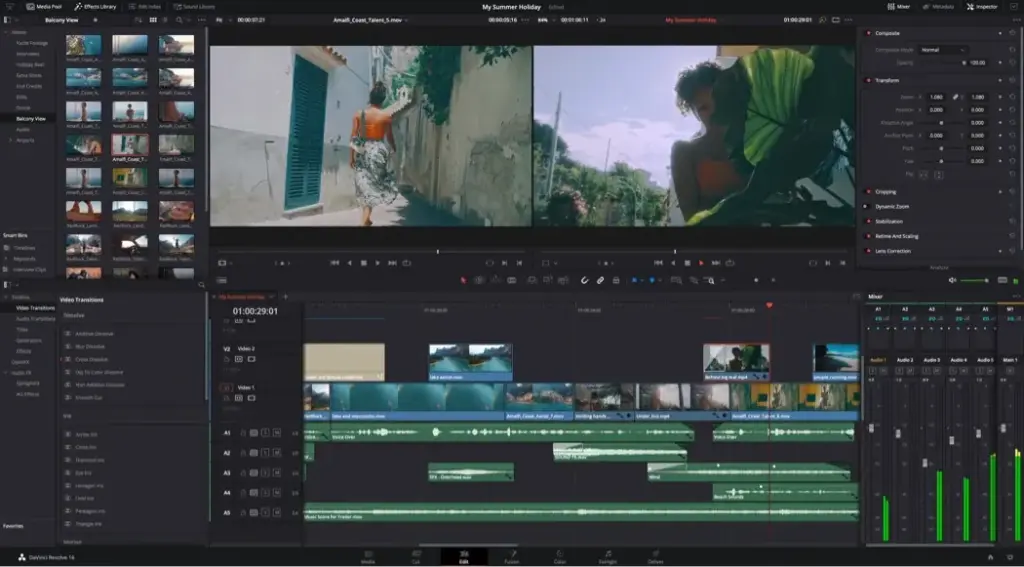
This davinci resolve review finds a remarkable program that combines editing, color grading, visual effects and audio in one package, with a free version that is genuinely capable. The learning curve is steep and hardware demands are high. It is the best value in video editing and the top choice for color work.
Verdict From This DaVinci Resolve Review
Resolve began as a high-end color grading system and grew into a full post-production suite. Its pages for media, cut, edit, Fusion, color, Fairlight audio and delivery cover the whole pipeline without switching programs.
The free version is generous enough for many professionals, including 4K timelines and the full color toolset. The paid Studio edition adds noise reduction, advanced AI tools, more codecs and collaboration features for a one-time fee rather than a subscription.
The price of that power is complexity and system load. A strong graphics card matters, and new editors may find the page-based layout confusing at first.
Performance and Reliability
Resolve leans heavily on the graphics card, so performance depends more on your GPU than on your processor. A recent card with generous video memory makes color grading and effects smooth, while an older or integrated one will struggle with 4K and node-heavy grades. Optimized media and proxies help weaker systems keep up. Stability is generally good, though very complex Fusion compositions can be demanding. The program also benefits from fast storage and a dedicated cache drive, and it warns you clearly when it runs short of memory.
Key Features
Edit and Cut Pages
The cut page is built for speed, while the edit page offers a conventional multi-track timeline. Start with Resolve edit page basics for the standard workflow.
Color Grading
The color page offers nodes, curves, qualifiers, power windows and tracking, and many colorists treat it as the benchmark. Setup matters, so review Resolve color management before grading important work.
Fusion Effects
A node-based compositor sits inside the same app, handling titles, cleanups and effects. The Fusion introduction explains the node approach.
Fairlight Audio
A full digital audio workstation handles mixing, noise reduction and effects, which is rare in a free editor.
LUTs and Delivery
Look-up tables apply consistent looks, and the delivery page exports to many formats. See LUTs explained for how they behave, and 8-bit vs 10-bit video for why bit depth matters when grading.
Learning Curve and Support
Resolve is learnable, but you need patience. Blackmagic publishes free training books and video courses that are among the best in the industry, and the community on forums and video platforms is large. Because each page is a separate workspace, it is sensible to learn them one at a time: cut or edit first, then color, then audio and effects. Many editors never touch Fusion. Expect a few weeks to be productive on the edit page and a few months to feel comfortable with color nodes.
Pricing
Resolve is offered free with a very capable feature set. The Studio version is a one-time purchase that has typically cost a few hundred dollars and is often bundled with Blackmagic cameras and hardware.
Studio adds features such as stronger noise reduction, more AI tools, additional codecs and multi-user collaboration. There is no subscription required. Check the vendor site for current pricing and version details.
For solo creators, the free version is often enough, and upgrading is a decision to make after you hit a real limit.
Is It Good Value?
Few products offer better value. The free version has no time limit or watermark, and the Studio upgrade is a single payment with free updates for the life of the version. Compared with a multi-year subscription to another editor, the savings are large. The main hidden cost is hardware, because a capable graphics card is almost a requirement. If you already own one, Resolve is practically free. If you must buy a new computer, factor that in.
Pros and Cons
What It Does Well
- The free version is more capable than many paid editors.
- Color grading tools are the best in the industry.
- Editing, effects, color and audio in one project file.
- Studio is a one-time purchase, not a subscription.
- Works across Windows, Mac and Linux.
Where It Falls Short
- Steep learning curve, especially for color and Fusion.
- Needs a strong graphics card and plenty of memory.
- Crowded interface may overwhelm beginners.
- Some codecs and tools require Studio.
- Smaller third-party template market than Premiere Pro.
Bottom Line
DaVinci Resolve is the program to beat. It offers professional color, solid editing, capable audio and compositing in one package at a price that is hard to ignore. The compromise is time and hardware: you need to invest in learning it and have a computer that can run it. If you are willing to do both, Resolve can carry you from your first video to professional work without ever needing to change programs. For anyone undecided between editors, it should be the first one you test.
Who It Is For
Resolve suits colorists, filmmakers, YouTubers who want free professional tools and editors willing to learn. It is especially good if you shoot log or raw footage and want accurate grading.
If you want the simplest possible editor, a beginner-focused program may be a better start. If you need constant interchange with Adobe tools, Premiere Pro has the advantage.
Camera settings affect your grading latitude. The explainers on dynamic range and video codecs help you shoot footage that grades well.
Getting Started
Download the free version, create a project and pick the timeline resolution and frame rate that match your camera. Import clips on the media page, then switch to the cut page for a quick assembly. Move to the edit page for finer trims and audio, then the color page to try primary wheels and a basic node tree. Export from the deliver page using a preset for your platform. Resist the urge to explore every page at once, and learn one new page each week.
Before You Buy
Before committing to DaVinci Resolve, run a short checklist. Confirm that your computer meets the system requirements, download the trial or free version if one exists, and test it on a real project from your own library rather than a demo file. Compare the exported result with what you get from your current tool, note how long each step takes, and check the vendor site for current pricing and upgrade terms. A program that suits the way you already work is worth more than one with a longer list of features.
Alternatives
The main competitors are subscription or one-time purchase editors.
| Alternative | Best Reason To Pick It |
|---|---|
| Adobe Premiere Pro | Better Adobe integration and templates |
| Final Cut Pro | Faster on Macs with a magnetic timeline |
| Wondershare Filmora | Simpler interface for beginners |
| Lightworks | Classic workflow with a lighter feature set |
Because Resolve is free, trying it costs only your time, which makes it a sensible first test for any editor.
Common Questions
Is DaVinci Resolve really free?
Yes. The free version includes editing, color, effects and audio, with some advanced features reserved for Studio.
Is Resolve good for beginners?
It can be learned by beginners, but the interface is dense. Start with the cut or edit page and ignore the rest at first.
Do I need the Studio version?
Only if you need its extra tools, such as advanced noise reduction or certain codecs. Many creators never upgrade.
What computer do I need?
A recent graphics card and plenty of memory matter most. Weak hardware makes the program sluggish.
Try It Yourself
See what it can do on your own photos and footage.
Some links are affiliate links: if you buy through them we may earn a small commission at no extra cost to you. How this works.