
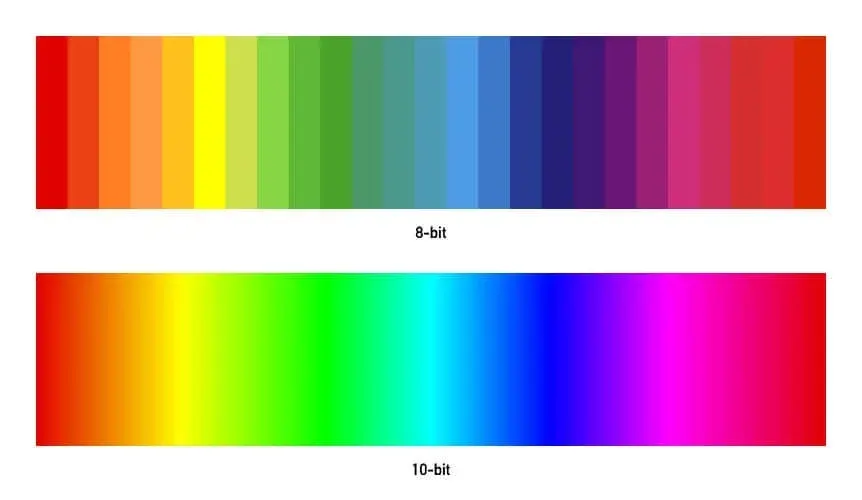
8-bit vs 10-bit video is a difference in how many tonal steps each color channel stores. An 8-bit file holds 256 levels per channel and a 10-bit file holds 1,024, so 10-bit gradients are smoother, banding is less likely and color grading has more room before the image breaks apart.
Why It Matters
Bit depth decides whether a sky looks like a smooth gradient or a set of visible bands. It also decides how far you can push color in editing before the picture falls apart.
Many cameras offer both options, and the 10-bit setting costs storage and sometimes battery. Knowing what you gain helps you choose when it is worth turning on.
Beginner 8-Bit Vs 10-Bit Video For Beginners
Bit depth is the number of binary digits used to store each color channel. Video has red, green and blue channels, and each uses 8 or 10 bits. More bits mean more possible values between black and white, so tones change in smaller steps.
The Numbers
| Depth | Levels Per Channel | Total Colors |
|---|---|---|
| 8-bit | 256 | About 16.7 million |
| 10-bit | 1,024 | About 1.07 billion |
| 12-bit | 4,096 | About 68.7 billion |
Sixteen million colors sounds like plenty, and for finished viewing it is. The trouble appears in smooth gradients such as sky, walls and studio backdrops, where there are not enough steps between two tones and the eye sees stripes.
What Banding Looks Like
Banding is visible bands of color where a smooth gradient should be. It is worst in dark, slowly changing areas, in compressed files and when you increase contrast or brightness in editing. A blue sky going from light at the horizon to deeper blue overhead is the classic place to see it.
Why It Matters For Grading
When you grade, you stretch tones. A flat log image may have an exposure range that uses only a portion of the available levels. Expanding it spreads those levels apart, and 8-bit may produce gaps. A 10-bit file has four times as many steps, so it can be stretched much further and still look smooth.
When 10-Bit Is Worth It
- Shooting in a log profile, where tones are compressed and later stretched.
- Footage with sky, fog, studio backgrounds or other smooth gradients.
- Projects that will be color graded heavily or composited with effects.
- HDR video, which needs more steps to cover a wide range of brightness.
When 8-Bit Is Fine
- Simple vlogs and events that will be exported with little grading.
- Well-exposed footage in a standard picture profile.
- Situations where storage and battery life are tight.
Common Mistakes
- Recording log in 8-bit and then trying to grade it heavily, which gives banding.
- Assuming 10-bit has more resolution or sharpness. It does not.
- Exporting 10-bit footage as 8-bit and blaming the camera for the bands.
- Forgetting that the monitor must also show 10-bit to see the benefit.
A Simple Rule Of Thumb
If you plan to grade, record 10-bit. If you plan to publish quickly with little adjustment and storage is tight, 8-bit is adequate. When unsure, 10-bit gives a margin of safety, and storage is cheaper than reshooting a scene with ugly bands in the sky.
Handy for this: Camera Gimbal — smooth handheld footage. (affiliate link)
Advanced Quantization, Dithering And The Full Chain
What Quantization Means
Quantization rounds a smooth value to the nearest available level. With only 256 levels, the rounding error is visible in slow gradients, particularly when the tones are stretched. Adding a small amount of noise before quantizing, called dither, breaks up the bands by spreading the error. Cameras and encoders vary in how they handle this, and sensor noise itself acts as natural dither in many shots.
10-Bit Does Not Work Alone
The benefit depends on the whole chain: the codec, chroma subsampling, bitrate and display. A low bitrate H.264 file can show blocks and bands even in 10-bit, because compression discards fine detail in smooth areas. A 10-bit 4:2:2 file at a healthy bitrate retains subtle tones. See video codecs, chroma subsampling and video bitrate for how these parts combine.
Working Space And Export
Edit in a 10-bit or higher pipeline, since many programs use 32-bit floating point processing internally. Export a 10-bit master such as ProRes or DNxHR for archival, then create an 8-bit H.264 for sharing, since many platforms and displays are 8-bit. When making the 8-bit file, apply a small amount of dither if your export tool offers it, and avoid strong gradients in the final look. This is part of color-managed workflow.
Banding In Delivery
Streaming services compress hard, which can create bands even from clean masters. To reduce them, add subtle film grain or noise to gradients before export, lift very dark shadows slightly and avoid very long smooth ramps in dark tones. A little grain looks more natural than visible bands.
Raw And Higher Depths
Raw formats record 12 or 14 bits of sensor data, which are converted to the editing depth. Raw offers more headroom for exposure and white balance changes, as discussed in raw bit depth. The number of bits describes tonal precision, while dynamic range describes the span of brightness the sensor can capture, and the two should not be confused. Read dynamic range explained to see the difference.
Testing Your Camera
- Film a blank wall or clear sky in both 8-bit and 10-bit with the same settings.
- Raise contrast and saturation strongly in your editor.
- Look at the gradient on a good display and note where bands begin.
- Repeat in a log profile to see how much more grading each mode allows.
The test takes a few minutes and tells you whether the extra storage is worth it for the way you shoot. In many cases, you will find that 10-bit matters most in log and almost not at all in a standard profile with gentle grading.
Try It
- Record a clear sky or plain wall in 8-bit and 10-bit modes on your camera, if both are available.
- Import both clips and apply the same strong contrast and saturation boost.
- View the gradients at full screen and note any visible bands.
- Check the file sizes and decide which mode suits each type of project.
Common Questions
Does 10-bit video look better without grading?
Not much. Without grading, 8-bit and 10-bit often look similar. The advantage shows when you stretch tones, work with log footage or have smooth gradients.
Can I convert 8-bit footage to 10-bit?
You can place it in a 10-bit file, but you cannot add real tonal information. It prevents further rounding errors during editing, but existing bands remain.
Is 10-bit the same as HDR?
No. HDR describes a wider brightness range and special transfer curves. HDR video usually needs 10-bit to avoid banding, but 10-bit can also be used for standard dynamic range.
How much more storage does 10-bit need?
The bit depth alone adds a modest amount, but cameras often pair 10-bit with higher bitrates and better chroma, so files may be much larger. Check the actual data rates in your menu.
Related Lessons
- Video Codecs to see how compression affects bit depth.
- Chroma Subsampling for the other half of color quality.
- Log Footage to learn why log needs more bits.
- Color Grading Basics to practice stretching tones safely.
- Raw Bit Depth for how stills use 12 and 14 bits.
Gear That Helps With This
Hand-picked kit that makes this lesson easier to put into practice.
Some links are affiliate links: if you buy through them we may earn a small commission at no extra cost to you. How this works.