
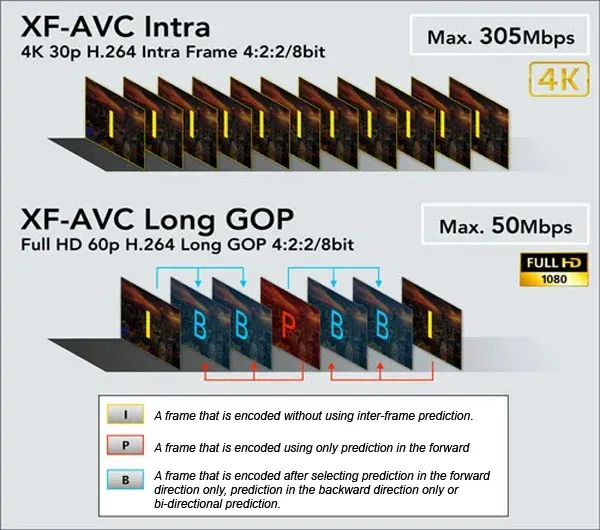
All-Intra vs Long-GOP is a choice between compressing every video frame on its own or compressing groups of frames together. All-Intra files are larger but easy to edit and very robust, while Long-GOP files are much smaller because most frames store only changes from nearby frames.
Why It Matters
This single menu option changes how big your files are, how fast your computer can edit them and how fast your memory cards need to be. Choosing wrongly can fill a card halfway through an interview or leave your editing software stuttering on a laptop.
Neither mode is simply better. Each solves a different problem, and knowing the difference lets you match the setting to the shoot instead of leaving it on whatever the camera shipped with.
Beginner All-Intra vs Long-GOP Basics
What The Names Mean
Video is a sequence of frames. In an All-Intra recording, every frame is a complete picture compressed independently. In Long-GOP, short for long group of pictures, the camera stores a full frame, called an I-frame, every so often, such as once every 12 to 30 frames. Frames in between store only the differences from neighbors. These are called P-frames and B-frames, and cameras often label the mode IPB.
Quick Comparison
| Feature | All-Intra | Long-GOP |
| File size | Large, often 2 to 3 times bigger | Small |
| Bitrate example at 4K | 400 to 600 Mbps | 100 to 200 Mbps |
| Editing speed | Smooth, easy on the computer | Heavier, needs a strong computer |
| Card demand | Fast cards often required | Standard fast cards |
| Resilience | Each frame is independent | A damaged frame affects its group |
| Quality per megabit | Lower efficiency | Higher efficiency |
When To Choose Each
– Choose All-Intra for color grading, heavy effects, green screen and any project where you want fast, accurate editing.
– Choose Long-GOP for long events, lectures, vlogs, travel and any time storage is tight.
– Choose Long-GOP if your computer is fast but your storage is small, and All-Intra if the reverse is true.
What You Need
All-Intra 4K at 600 Mbps writes about 75 megabytes per second, so check the card rating before shooting. Look for the video speed class, such as V60 or V90, and the exact requirement in your camera manual. A 128 GB card might hold about 30 minutes of high bitrate All-Intra footage but several hours of Long-GOP at the same resolution.
Common Mistakes
– Shooting All-Intra on a slow card and getting a recording stopped error.
– Using Long-GOP and then trying to edit on an old laptop without proxies.
– Assuming a bigger file always looks better, when the difference is often small in a normal scene.
– Forgetting that bitrate also depends on frame rate and resolution.
Handy for this: Fast Wide-Angle Lens — gather more starlight. (affiliate link)
Advanced How Long-GOP And All-Intra Work Under The Hood
Inter-Frame Prediction
Long-GOP uses motion compensation. The encoder predicts a frame from a reference frame and a set of motion vectors, and then stores only the residual error. P-frames refer to earlier frames, and B-frames refer to both earlier and later ones, which is why they save the most data. A fixed camera filming a static background compresses very well, since most pixels barely change. Fast pans, water, confetti and film grain compress poorly, and the encoder may smear detail to stay within its bitrate.
Why Editing Is Harder
To show one frame in a Long-GOP file, the editor may need to decode a whole group of pictures and rebuild the frame from its references. Scrubbing backwards is especially demanding. Hardware decoding on modern graphics chips and Apple silicon reduces the load, but older machines still struggle. All-Intra files decode one frame at a time, which makes reverse playback, speed ramps and fast cuts smooth. Related codec ideas appear in video codecs and video bitrate.
Quality And Bitrate Efficiency
Long-GOP can deliver surprisingly good quality at a low bitrate in simple scenes, but it breaks down in complex motion. All-Intra spends bits on every frame so it handles tricky scenes consistently. For flat images with gradients, higher bit depth and chroma detail often matter more than the compression style. See 8-bit vs 10-bit video and chroma subsampling for those choices, and look for cameras that combine 10-bit with All-Intra when you plan a heavy grade.
Proxies And Intermediate Codecs
If you shoot Long-GOP but your computer cannot keep up, create proxies, which are small, easy files that your editor uses while cutting and then swaps for the originals at export. Another path is transcoding to an editing codec such as ProRes or DNxHR, which are intra-frame by design. The trade-off is extra time and disk space. Editors discuss this in proxy editing and the broader offload workflow.
Reliability And Storage Planning
An intra-frame file loses only a frame if data is damaged. A damaged Long-GOP file can lose a whole group, which is a fraction of a second to a second. Dual card recording protects against both. For storage planning, multiply bitrate in megabits per second by shoot time in seconds and divide by 8 to get megabytes. At 400 Mbps, one hour is about 180 gigabytes.
Choosing Per Project
Many productions mix modes. They shoot All-Intra for interviews and effects shots, and Long-GOP for long B-roll or second cameras. Keep your settings consistent within a scene so the footage cuts together cleanly.
Frame Rates, Resolution And Bitrate Together
Compression choice interacts with everything else. A 4K 60p Long-GOP file may need a similar bitrate to a 4K 24p All-Intra file, because the Long-GOP encoder has more motion to describe. High frame rate slow motion is often recorded All-Intra for that reason, so that each frame stays clean. When your camera lists several quality options, compare the actual bitrates in the manual and choose from the numbers, not from the labels.
Audio, Timecode And Metadata
The compression style does not change audio or timecode. Both modes record the same linear PCM or compressed audio, and the same clip metadata. What changes is how editing software handles scrubbing and effects. If you plan to sync multiple cameras, an intra-frame format makes frame-accurate alignment simpler, since you can land exactly on any frame without waiting for a reference frame to decode.
Archiving And Delivery
Archive the camera originals in either mode, because the highest quality copy is the one you keep. For delivery, files are re-encoded to a delivery format such as H.264 or H.265, which is itself Long-GOP. Starting from All-Intra gives the encoder a cleaner source, which can help in smooth gradients. Starting from Long-GOP is perfectly fine for ordinary web delivery.
A Simple Decision Guide
If you are unsure, shoot Long-GOP for anything long and uncomplicated, and All-Intra when you know the footage will be graded hard or composited. Test both with your own camera, card and computer before an important job, since real performance depends on the whole chain, not a spec sheet.
Try It
- Record the same 30 second scene in Long-GOP and All-Intra at the same resolution and frame rate.
- Note the file sizes and compute the bitrate of each.
- Drag both clips into your editor and scrub backward through the timeline on each.
- Apply a strong color grade and compare the gradients in the sky or a wall for banding.
Common Questions
Is All-Intra better quality than Long-GOP?
Not always. All-Intra is more consistent and easier to edit, but Long-GOP can look equal at lower bitrates in simple scenes. The difference shows up most in complex motion and heavy grading.
Why are my All-Intra files so large?
Every frame is stored as a complete compressed image, so there is no saving from similarity between frames. File sizes are commonly two to three times those of Long-GOP.
What is IPB?
IPB is a camera label for Long-GOP recording. It refers to the I-frames, P-frames and B-frames that make up each group of pictures.
Do I need a faster card for All-Intra?
Usually yes. Higher bitrates require faster sustained write speeds, so check the card class listed in your camera manual before shooting.
Related Lessons
- Video Codecs for the formats that hold compressed video.
- Video Bitrate to understand how data rate relates to quality.
- 8-Bit Vs 10-Bit Video for the other major quality setting.
- Chroma Subsampling to see how color detail is stored.
- Filmora Proxy Editing for smoother editing of heavy footage.
Gear That Helps With This
Hand-picked kit that makes this lesson easier to put into practice.
Some links are affiliate links: if you buy through them we may earn a small commission at no extra cost to you. How this works.