
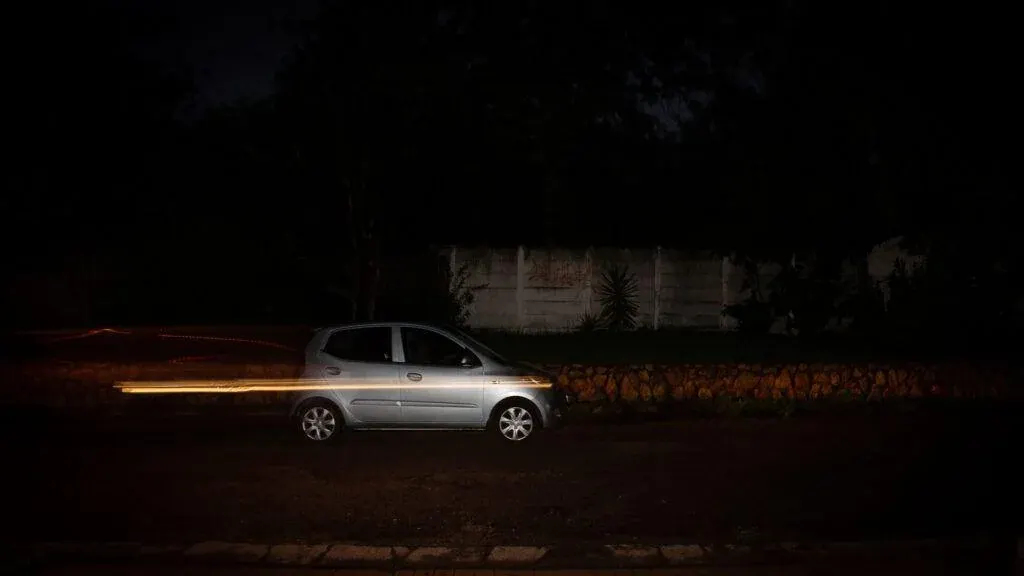
Rear curtain sync fires the flash at the end of the exposure, just before the second shutter curtain closes. A slow shutter records ambient light and motion blur first, then the flash freezes the subject at its final position. The trail appears behind the subject, which looks natural and suggests movement.
Why It Matters
With the default setting, flash fires at the start of the exposure. Ambient light then keeps recording after the flash, so a moving subject has a blur streak in front of the sharp image, which looks as if it moves backward.
Rear curtain sync fixes this. It is a simple setting change that gives energetic party, street and sports pictures a professional look.
Beginner Rear Curtain Sync For Beginners
A focal-plane shutter has two curtains. The first opens to start the exposure and the second closes to end it. In front curtain sync, the flash fires right after the first curtain opens. In rear curtain sync, also called second curtain sync, it fires just before the second curtain closes.
Why It Looks Better
Light trails and motion blur record while the shutter is open. If the flash fires first, the sharp frozen image sits at the start of the path, and the trail spreads ahead of it. If the flash fires last, the sharp image sits at the end, and the trail follows behind. Our eyes expect trails to follow a moving object.
Basic Settings
| Setting | Suggested Value |
|---|---|
| Mode | Aperture priority, or manual for control |
| Shutter speed | 1/30 to 1 second, depending on motion |
| Flash sync mode | Rear, second curtain or slow sync rear |
| ISO | Low to medium, such as 100 to 800 |
| Flash power | TTL with a little negative compensation |
Step By Step
- Turn on the flash and set the sync mode to rear curtain in the camera or flash menu.
- Choose a shutter speed slow enough to show motion, such as a quarter second.
- Meter for the background so the ambient scene is exposed correctly.
- Let the flash light the subject, and keep the subject moving in a clear direction.
- Review the result and adjust shutter speed to lengthen or shorten the trail.
Good Uses
- Cars, bicycles and runners moving across the frame at dusk.
- Dancing and party pictures with colorful background lights.
- Sparklers and light painting around a person.
- Water, spinning rides and fairground lights.
Common Mistakes
- Leaving the flash in the default mode and getting trails in front of the subject.
- Using a shutter speed that is too fast to show any trail.
- Holding the camera unsteadily, which blurs the whole frame, not just the moving subject.
- Setting the flash too bright, which kills the ambient mood.
When To Skip It
If you want a clean, frozen subject with no trail, use a fast shutter speed and normal flash mode. Rear curtain sync is for moments when you want motion to be part of the story.
Handy for this: Carbon Fiber Tripod — sharp at slow shutter speeds. (affiliate link)
Advanced Dragging The Shutter And Timing Details
Dragging The Shutter
Dragging the shutter means using a slow shutter speed with flash so that the background is exposed by ambient light. Without it, flash pictures show a bright subject against a black background. Rear curtain sync is one way to drag the shutter. The slow speed lets ambient light fill in the scene, and the flash freezes the subject. The balance is controlled separately, as covered in ambient and flash.
Two Exposures In One Frame
The ambient exposure depends on shutter speed, aperture and ISO. The flash exposure depends on flash power, aperture, ISO and distance, but not on shutter speed within the sync range. Because of this, you can lengthen the trail by slowing the shutter without changing the flash exposure on the subject, and lighten the background without changing the subject brightness. See exposure triangle explained.
Interaction With Flash Sync Speed
Rear curtain sync works within the camera flash sync speed, often 1/200 or 1/250 second. Slower speeds are always fine. Faster speeds need high speed sync, which behaves differently, since the flash fires as a series of pulses, as described in high speed sync. Rear curtain mode does not normally combine with high speed sync, since the shutter is a moving slit.
Pre-Flash And TTL
In TTL mode the camera fires measuring pre-flashes. With rear curtain sync, these pre-flashes happen earlier in the exposure, and the main flash fires at the end. The subject may see the early flashes and blink or move, so warn people. With long exposures, subjects may think the picture is finished after the first flash. In manual flash, there is no pre-flash. See TTL versus manual flash for a deeper comparison.
Creative Variations
- Zoom the lens during the exposure and fire the flash at the end for a burst effect.
- Pan with the subject to keep the subject sharp and the background streaked, as in panning technique.
- Use a colored gel on the flash, from flash gels, to separate the subject from warm ambient lights.
- Move the camera deliberately in a pattern to turn background lights into abstract lines.
Verifying The Result
Check the picture at full zoom for the sharp subject and the trail location. If the trail is in front, the camera is in front curtain mode. If the trail is too faint, slow the shutter or raise ISO. If the subject shows a second ghost, the subject moved after the flash or the ambient light was too bright. In bright light, lower the ambient with a smaller aperture or an ND filter.
Practice with a safe moving subject, such as a friend walking in a dim room or a toy car on a table, and repeat it at several shutter speeds. Notes on which speeds gave the best trail will make you faster at real events.
Sync With Off-Camera Flash
Wireless triggers and radio systems can support rear curtain mode, but the trigger must send its signal at the right time. Test the combination before an event, because some older triggers fire at the start only. Hot shoe flashes on cameras with a leaf shutter in the lens may allow faster sync, so check the lens specifications if you use a medium format system.
Try It
- Set your camera to aperture priority, ISO 400, and turn on the flash.
- Switch the flash sync mode to rear curtain and set a shutter speed near a quarter second.
- Photograph a friend walking across a dim room, then repeat in front curtain mode.
- Compare the two pictures and note where the trail appears in each.
Common Questions
What is the difference between front and rear curtain sync?
Front curtain fires the flash at the start of the exposure, and rear curtain fires it at the end. Rear curtain puts motion trails behind the subject.
Does it work with fast shutter speeds?
The effect only shows when the shutter is slow enough for trails to form. With fast speeds there is little difference.
Does an electronic shutter support rear curtain sync?
Many cameras support it, but behavior varies, and some electronic shutter modes limit flash use. Check your camera manual.
Why does my flash fire twice?
This can be a pre-flash for TTL metering, or the camera may be in a red-eye reduction or stroboscopic mode. Use manual flash power to remove pre-flashes.
Related Lessons
- Ambient And Flash to balance flash with the existing light.
- High Speed Sync for flash at shutter speeds above the sync limit.
- TTL Vs Manual Flash to control pre-flash behavior.
- Panning Technique for combining motion blur with a sharp subject.
- Flash Guide Number to estimate flash power and distance.
Gear That Helps With This
Hand-picked kit that makes this lesson easier to put into practice.
Some links are affiliate links: if you buy through them we may earn a small commission at no extra cost to you. How this works.