
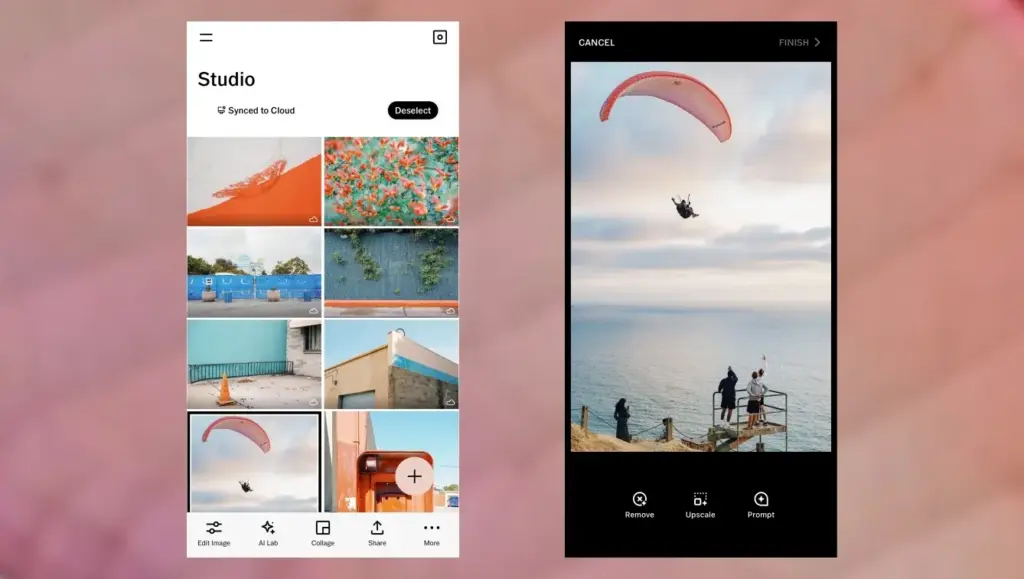
This vsco review finds a stylish mobile editor best known for film-inspired presets and a creative community. Its tools handle exposure, color and grain well, while the paid membership adds more looks and features. It suits people who want a signature style quickly, but serious editors may want deeper controls.
Verdict From This Vsco Review
VSCO built its reputation on presets that imitate classic film stocks. Tap a look, adjust its strength and you have a consistent, tasteful style in seconds. That focus on mood and cohesion, more than on technical retouching, is the app’s defining quality.
Beyond presets, it includes the usual editing tools such as exposure, contrast, white balance, highlights, shadows, tint, grain and fade, plus a few extras like a split tone control and selective color. They are easy to understand and fast to use on a phone.
It also doubles as a community, with a feed and profiles aimed at creative photographers. Whether that appeals depends on taste. The main thing to know is that many of the best looks and tools sit behind a membership, so the free version is more of a sampler.
Performance and Quality
The app is responsive for ordinary photos and applies presets nearly instantly. Exports are clean when you choose full quality, though heavy grain and fade can add noise or reduce detail if overdone. Video editing is available in the paid tier and runs well on recent phones. Importing very large raw files takes longer, and older phones may struggle with long edit stacks. As with any preset-based workflow, results depend on the lighting of the original, so a look that suits one scene may need adjustment on the next.
Key Features
Film-Inspired Presets
The preset library covers warm and cool film emulations, muted tones, high contrast black and white and soft pastel styles. Each can be dialed back with a strength slider, which is the most important control. The idea behind them is similar to the lesson on LUTs explained, applied to stills.
Core Editing Tools
Exposure, contrast, saturation, temperature, tint, highlights, shadows, sharpen, clarity and vignette are all present. They are simple but effective, and they follow the same logic as the Lightroom basic panel, just with fewer options.
Color and Creative Controls
HSL, split tone and fade help shape a color palette, while grain adds texture. Picking harmonious tones is easier when you understand color harmony, and the app makes experimenting quick.
Raw and Capture Tools
You can shoot in-app with manual controls and capture raw files on supported phones, then edit them with the same presets. This gives more room for adjustment than a compressed file, as explained in raw versus JPEG.
Community and Video
Profiles and a feed let you share work and follow others, and the paid tier adds video editing with presets applied to clips. Not every user wants a social layer, and it can be ignored if you only want an editor.
Learning Curve
VSCO is one of the easiest editors to learn. Presets do the heavy lifting, and each tool has a clear name and slider. The risk is overusing presets until every image looks alike. Learning to adjust exposure and white balance first, then applying a look at reduced strength, produces cleaner and more individual results than stacking effects on a poorly exposed frame.
Matching Looks Across a Set
A strong use of VSCO is keeping a series consistent. Choose one preset and tweak it for each photo, rather than switching styles from frame to frame. Saving your own recipe lets you reapply the same settings later. If you want a similar workflow on a desktop, see picture styles and creative looks for ways to build a style at capture time.
Where It Falls Short
There is no local adjustment brush as powerful as some rivals, no layers and limited batch tools. Organizing a large library is not its strength, and some features require an account. Users wanting masking, healing or AI removal will need another app.
Value for Money
The free version is useful for trying the style. The membership makes sense if you edit often and love the looks, but it is less compelling if you only want basic fixes, which free editors can handle. A trial period is usually offered, so test it on a real set of photos before paying.
Tips For Better Results
Shoot with good light, expose for the highlights and keep the original file untouched. Apply a preset, then lower its strength until skin tones look natural. Adjust white balance before adding fade or grain, because those effects exaggerate a color cast. Save the settings you like as a recipe and reuse them on the next set. These small habits matter more than which preset you pick, and they keep a whole gallery looking like it belongs together rather than like a collection of unrelated filters.
Platforms and Compatibility
VSCO runs on iPhone and Android, and a web presence supports the community side. Editing is designed for phones, so there is no full desktop editor to pair with it. Edited photos export as standard image files that open anywhere. If you move to another editor later, your finished pictures come with you, though the preset recipes themselves stay inside the app.
Final Thoughts
VSCO excels at one thing, giving ordinary photos a cohesive and attractive mood with very little effort. Judge it on that single strength and it is hard to fault, judge it as an all-purpose editor and it will disappoint. Knowing which of those two jobs you want done is the whole decision.
Pricing
VSCO offers a free tier with a limited set of presets and tools, and a paid membership that unlocks the full preset library, advanced tools and video editing. Membership is billed monthly or yearly, and a trial period is often available.
Pricing and the split between free and paid features change over time, so check the vendor site for current pricing before you subscribe. Compare the cost with a general editor that includes presets and masking, since the right choice depends on whether the VSCO look is the one you want.
Pros and Cons
What Works Well
- Beautiful film-inspired presets with strength control
- Simple, quick editing tools
- Raw capture and editing on supported phones
- Useful for keeping a series consistent
- Free tier lets you try the style
What Holds It Back
- Best looks and tools need a membership
- Limited local adjustments and no layers
- Weak library and batch tools
- Easy to overuse presets
Who It Is For
VSCO suits social photographers, travelers and hobbyists who want a distinctive look without a long learning curve. It is also a good pick for anyone who loves the film aesthetic and prefers to edit on a phone.
It is less suited to people who need precise retouching, product consistency or a large managed library. Those users will do better in a catalog editor. If you do use presets, learn the basics of exposure first so the look sits on a solid foundation, and remember that color grading in Lightroom offers deeper control on a computer.
Alternatives
Several editors offer presets and mobile editing.
| Alternative | Best Reason To Pick It |
|---|---|
| Adobe Lightroom Mobile | Powerful masks and cloud sync with preset support |
| Snapseed | Free, with strong selective tools |
| Pixelmator Photo | Polished Apple-only editing with good color tools |
| Adobe Photoshop Express | Quick fixes, collages and templates |
If the look matters most, VSCO is a natural pick. If control matters more, choose an editor with masks and a proper library.
Common Questions
Is VSCO free?
There is a free tier with a limited set of presets and tools. A paid membership unlocks the full library and extras.
Is VSCO good for editing photos?
Yes for quick, stylish edits on a phone. It is lighter on advanced tools like masking and healing.
Can VSCO edit raw files?
Yes, on supported devices it can capture and edit raw files, giving more room for adjustment than JPEG.
Is the VSCO membership worth it?
It is worth it if you use the presets regularly and like the style. Use the trial to decide.
Try It Yourself
See what it can do on your own photos and footage.
Some links are affiliate links: if you buy through them we may earn a small commission at no extra cost to you. How this works.