
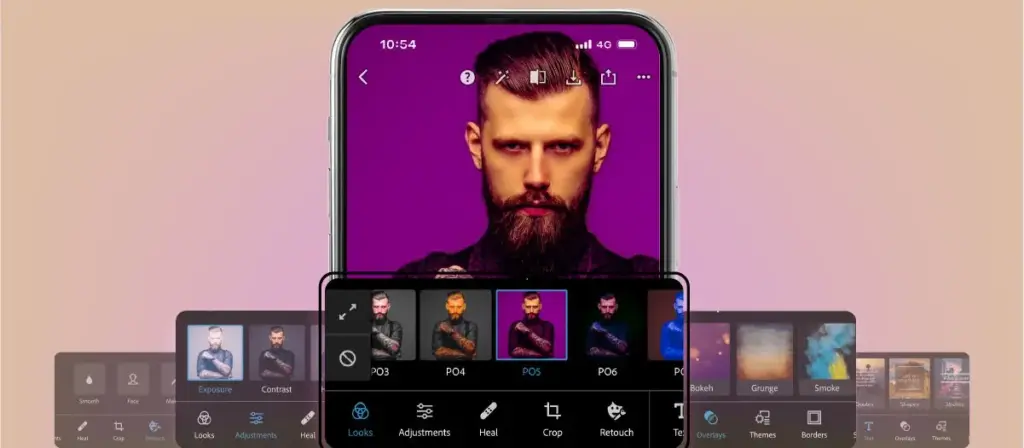
This adobe photoshop express review finds a fast, friendly mobile editor built for quick fixes and social posts. It offers healing, cutout, collages, filters and templates with a generous free tier. It suits casual editors who want speed, but it lacks the layers and depth of full Photoshop.
Verdict From This Adobe Photoshop Express Review
Adobe Photoshop Express is the lightweight, phone-friendly member of the Photoshop family. Despite the name, it is not a cut-down desktop program but a separate app aimed at quick fixes, social media graphics and simple creative edits.
You can crop, straighten, adjust color, remove blemishes, erase small objects, cut out a subject and add text or stickers, all with large buttons and clear previews. Collages and ready-made templates make it easy to produce a shareable result in minutes.
It is generous on the free tier, though some effects, fonts and tools sit behind a paid plan. It will not replace a raw editor or a layer-based program, and it is not meant to. Its strength is speed and simplicity.
Performance and Quality
The app launches fast and applies most edits instantly on a recent phone. Tools that rely on cloud processing, such as some removal and cutout features, need an internet connection and take a moment. Export quality is good for social media and prints at modest sizes, and you can choose file type and size. Very large files or long projects can use a lot of memory on older phones. Saving a copy rather than replacing the original is wise, as with any quick editing app.
Key Features
Quick Fixes and Auto Tools
Auto-fix, exposure, contrast, highlights, shadows and sharpening handle common problems with one or two taps. For a blurry or dull shot, the lesson on how to fix blurry shots quickly explains what is and is not recoverable.
Spot Healing and Object Removal
Tap a blemish or small distraction and the app fills it using surrounding detail. It is fast and works well on small items. For the thinking behind it, see healing and clone tools and content-aware fill.
Cutouts and Background Changes
One-tap subject selection removes or replaces a background, which is useful for profile pictures and product photos. Results are best on clear edges, and the concept is explained in subject isolation.
Crop, Straighten and Resize
Presets for common social formats make it easy to frame an image for a feed, story or print. Choosing the right shape is easier with an understanding of aspect ratios, and the cropping photos lesson covers composition.
Collages, Templates and Text
A library of layouts, templates, stickers, borders and fonts speeds up creating posts, flyers and cards. Brand colors and fonts can be applied for a consistent look. Many premium assets require a paid plan.
Learning Curve
There is almost nothing to learn. Tools are laid out in a bottom row, previews update live, and an undo button is always close. The challenge is knowing when to stop, since filters and effects are easy to overdo. Working in a sensible order, fixing exposure first, then cleanup, then style, keeps results natural and avoids the heavy-handed look common in quick edits.
Cloud and Cross-Device Features
Projects and assets can sync through an Adobe account, so you can continue on another device in some cases. Sign-in is needed for several features and for the paid plan. If you already use other Adobe apps, the account integration feels natural, and shared fonts and assets can carry across.
Where It Falls Short
There are no layers in the full sense, no raw development panel as capable as Lightroom or Camera Raw, and little batch processing. Advanced users will feel boxed in. It is a finishing and social tool rather than a core editor.
Value for Money
The free tier is enough for many people. The paid plan adds premium assets and some advanced tools, and it makes sense if you create lots of social content. If your needs are simple, you can stay on the free version indefinitely and lose very little.
Tips For Better Results
Begin with the straightening and crop tools, then correct exposure and color before touching filters. Use healing for small distractions and cutout only when the subject has clear edges. When designing a post, keep text short, choose one or two fonts and leave breathing room around it. Export at the size your destination needs, since oversized files slow uploads and gain nothing. A few minutes of restraint produces results that look intentional rather than over-processed, even though the tools make heavy effects very easy to apply.
Platforms and Compatibility
The app is available for iPhone and Android, with web and desktop versions of some features in certain regions. Files open and export as common formats such as JPEG and PNG, so finished work moves easily into other programs. Compatibility with layered Photoshop files is limited, so do not expect to open a complex PSD and keep every layer editable in this app.
Privacy and Accounts
You can do basic edits without much friction, but signing in with an Adobe account unlocks sync and cloud tools. If you prefer to keep things local, stick to on-device edits and export manually. Review the permissions the app requests and the terms for any cloud processing, especially if you edit photos of other people or client work.
Pricing
The app is free to download and use for core editing, with a paid tier that adds premium templates, fonts, effects and additional tools. The paid plan is usually billed monthly or yearly and may be included in some larger Adobe plans.
Terms change, so check the vendor site for current pricing and what each tier includes. Try the free version first and only upgrade if you find yourself repeatedly hitting a locked feature you genuinely need.
Pros and Cons
What Works Well
- Fast, friendly and easy to use
- Generous free tier
- Cutout, healing and collage tools in one app
- Templates and presets for social formats
- Syncs with an Adobe account
What Holds It Back
- No true layers or deep editing
- Some tools and assets need a paid plan
- Cloud features need an internet connection
- Limited batch and raw options
Who It Is For
It suits casual photographers, small business owners and social media users who want polished results fast. If you need to fix a photo, remove a background or make a quick graphic from your phone, it is a very practical tool.
It is not intended for professional retouchers or people who edit raw files at volume. Those users should look at Lightroom or Photoshop. A sensible approach is to use Express for quick public-facing posts and a heavier editor for the files you care about most, and to understand the basics of raw versus JPEG so you know when a phone edit is enough.
Alternatives
Several mobile editors overlap with Express.
| Alternative | Best Reason To Pick It |
|---|---|
| Snapseed | Free with strong selective tools |
| VSCO | Film-style presets and community |
| Canva | Better for graphic design and branded layouts |
| Adobe Lightroom Mobile | Raw editing and masks on a phone |
For quick fixes and graphics, Express is easy to recommend. For serious photo work, choose a tool with raw support.
Common Questions
Is Adobe Photoshop Express free?
Yes, the core app is free. Premium templates, fonts and some tools need a paid plan.
Is Photoshop Express the same as Photoshop?
No. It is a separate, simpler app for quick edits and social graphics, without full layers.
Can Photoshop Express remove backgrounds?
Yes, it offers a one-tap cutout that works best on clear subject edges.
Does it work offline?
Basic edits work offline, while some cloud-based tools need an internet connection.
Try It Yourself
See what it can do on your own photos and footage.
Some links are affiliate links: if you buy through them we may earn a small commission at no extra cost to you. How this works.