
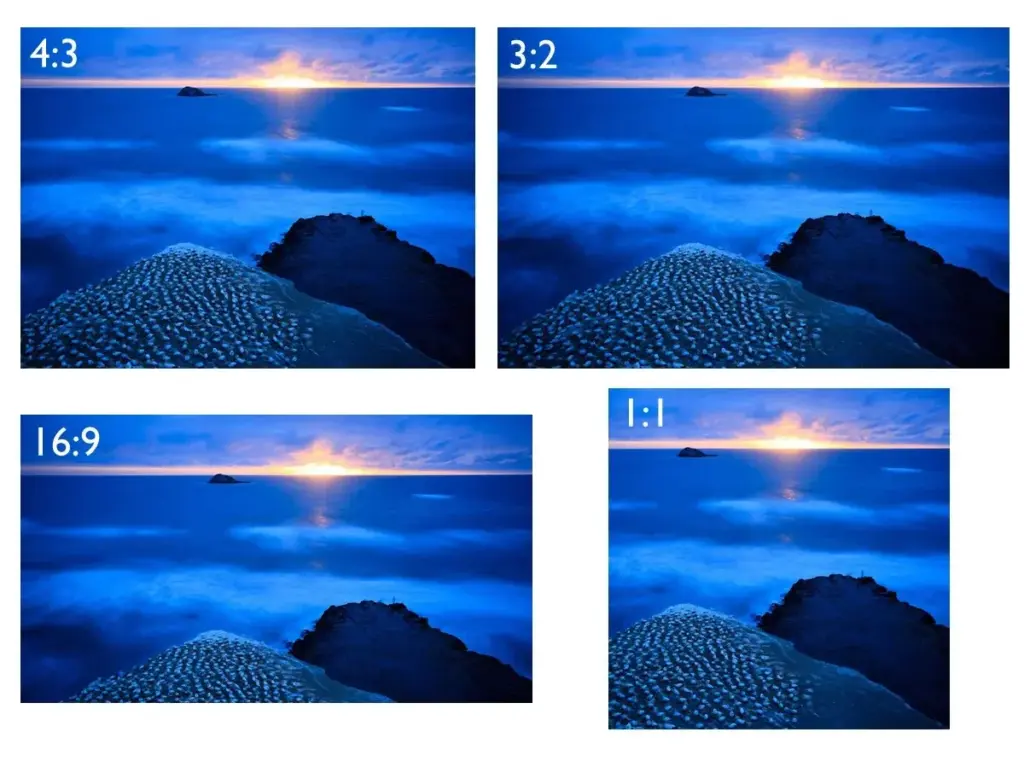
Aspect ratio is the proportion between the width and height of an image, written as width to height. Common choices are 3:2 for full-frame cameras, 4:3 for smaller sensors, 16:9 for video and 1:1 for squares. The ratio changes how you compose, how pictures print and how they fit on screens.
Why It Matters
The shape of the frame decides where the eye travels and what fits inside it. A tall subject feels cramped in a wide frame, and a wide landscape can look lost in a square.
Choosing the ratio before you shoot, or planning crops afterward, gives you control over composition and avoids losing important parts of a picture when you print or post.
Beginner Aspect Ratio For Beginners
An aspect ratio is written as two numbers, such as 3:2. It means that for every three units of width there are two units of height. The numbers describe shape, not size, so a small and a large picture can share the same ratio.
Common Ratios
| Ratio | Where You Find It | Feel |
|---|---|---|
| 3:2 | Full-frame and APS-C cameras, 35 millimeter film | Balanced, classic |
| 4:3 | Micro Four Thirds, many phones, compact cameras | Slightly taller, compact |
| 16:9 | Video, TV, YouTube | Wide, cinematic |
| 1:1 | Square pictures, medium format, social posts | Stable, centered |
| 5:4 and 4:5 | Large format, portrait posts on social apps | Tall, intimate |
| 2.39:1 | Widescreen cinema | Epic, very wide |
How The Ratio Changes Composition
- Wide ratios suit landscapes, horizons and movement across the frame.
- Tall ratios suit portraits, trees and buildings.
- Squares encourage centered or symmetrical layouts, as in symmetrical composition.
- Cinematic ratios add empty space at the sides, which can be used for tension or context.
Setting The Ratio
- Open the image or video menu on your camera and find aspect ratio.
- Choose the ratio you want, or leave it at the native shape if you are unsure.
- Check the display, which usually shows lines or a mask for the chosen shape.
- Compose inside the guides and leave room to crop later.
- If you shoot raw, the full sensor data is often kept, even when the preview is cropped.
Printing And Display
Standard print sizes do not all match camera ratios. A 3:2 photo fits a 4 by 6 inch print, but an 8 by 10 inch print is 5:4, so some of the picture is trimmed. Check the crop before you order prints, as discussed in cropping photos and photo paper types.
Common Mistakes
- Shooting tight to the edge and later discovering a needed crop cuts off important details.
- Using a wide ratio for a subject that is naturally tall.
- Forgetting that social media crops previews to a fixed shape.
- Changing ratio too many times in a single series, which looks inconsistent.
Keep Your Options Open
When in doubt, shoot in the native ratio and leave a little space around the subject. You can always crop to a different shape later, but you cannot add pixels that were never captured.
Handy for this: Fast Prime Lens — creamy backgrounds, low light. (affiliate link)
Advanced Cropping, Delivery And Visual Effects Of Shape
Native Ratio And Cropping
Your sensor has a native aspect ratio. Choosing a different ratio in camera either crops the sensor or masks the view, and with raw files you can often restore the full frame later. Cropping in editing reduces the number of pixels, so a stronger crop lowers resolution. Plan the final ratio and leave some margin, then crop with tools like those in crop and canvas.
Video And Cinema Ratios
Video standards use 16:9 for web and TV, and vertical formats such as 9:16 for mobile. Cinema uses wider formats such as 2.39:1, which can be made by cropping a 16:9 frame or by using anamorphic lenses, as in anamorphic lenses. See cinematic aspect ratio and vertical video framing for the details.
Composition Effects
A wider frame lets horizontal lines such as horizons dominate, and it gives room for the rule of thirds, as in rule of thirds composition. A narrow frame gives a stronger vertical feeling and brings subjects closer together. A square frame removes the sense of direction, so the viewer focuses on shapes and balance. Experiment with a crop overlay to see how the same picture feels in each shape.
Planning A Series
For a gallery, book or website, pick one or two ratios and use them consistently. Mixed shapes can look messy on a wall, though a deliberate mix of landscape and portrait works well when sizes are balanced. Create crop presets in your editing software and apply them to all pictures in the set.
Platform Requirements
- Photo feeds often display 4:5 or 1:1 best, and may crop wider images.
- Video sites expect 16:9 for horizontal video and 9:16 for short vertical clips.
- Print labs list sizes in inches or centimeters, so check their ratio before ordering.
- Web pages can display any ratio, but a consistent shape makes grids neater.
Resolution And Pixel Count
A 24 megapixel image at 3:2 is about 6000 by 4000 pixels. Cropping to 16:9 yields about 6000 by 3375, or 20 megapixels, and cropping to 1:1 gives about 4000 by 4000, or 16 megapixels. The loss is small for most uses, but matters for large prints. Compare resolution settings in resize and resolution.
Checking Your Work
View the picture in the shape it will be used, such as a phone mockup for social posts or a print-size preview. Check that heads, hands and text are not cut off by the crop. Use guides and grids in your editor, and compare more than one crop before choosing. If the picture only works in one ratio, note that in your file for later, so you can export the right version quickly.
Designing For Multiple Shapes
If you publish one picture in several places, compose with a safe zone in the middle so that any crop keeps the subject. Place important elements in a central square, and let the edges contain only supportive detail. This approach works well for banners, thumbnails, prints and vertical crops from a single frame.
Try It
- Take one scene in the ratio your camera uses by default.
- In your editor, make crops to 3:2, 4:3, 16:9 and 1:1 of the same picture.
- Look at each crop and note which one feels best and which loses important details.
- Pick one ratio for your next series of photos and use it consistently.
Common Questions
What aspect ratio do most cameras use?
Full-frame and APS-C cameras use 3:2, Micro Four Thirds and many phones use 4:3, and video modes use 16:9.
Does changing the ratio in camera reduce quality?
It reduces the pixels used because the picture is cropped. With raw files, the full data is often kept so that you can undo the crop later.
Which ratio is best for printing?
It depends on the print size. 3:2 fits 4 by 6 inch prints, while 8 by 10 inch prints need a 5:4 crop. Choose the print first, then crop.
Which ratio is best for social media?
Check the platform. Many photo feeds favor 4:5 for tall posts and 1:1 for squares, and short video feeds use 9:16.
Related Lessons
- Cropping Photos for improving composition after the shot.
- Cinematic Aspect Ratio to learn about widescreen video shapes.
- Rule Of Thirds Composition for placing subjects in the frame.
- Vertical Video Framing for tall formats.
- Crop And Canvas to change frame shape in Photoshop.
Gear That Helps With This
Hand-picked kit that makes this lesson easier to put into practice.
Some links are affiliate links: if you buy through them we may earn a small commission at no extra cost to you. How this works.