
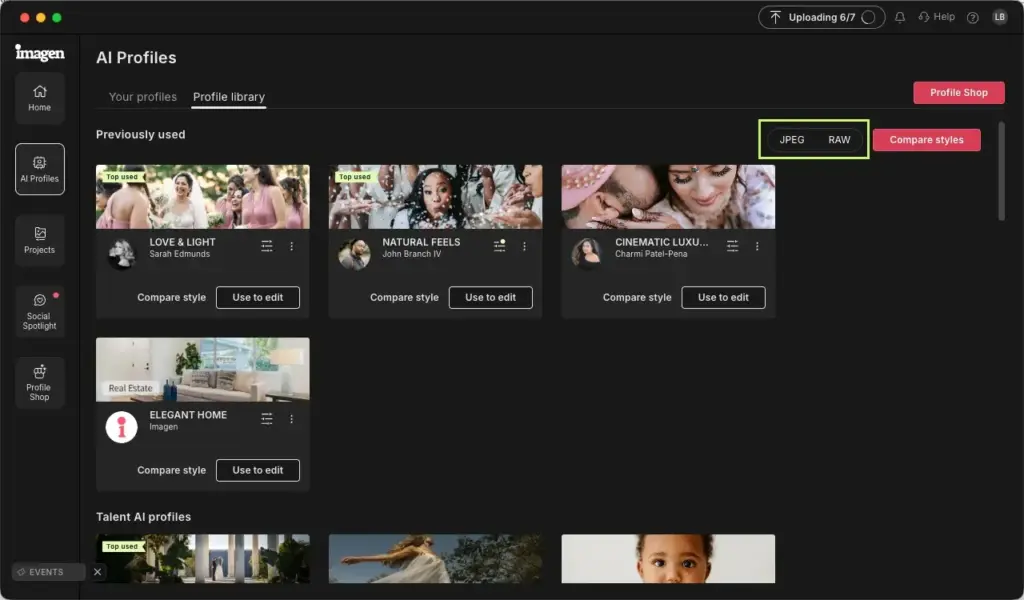
This imagen ai review finds an AI service that learns your editing style and applies it to whole shoots. It integrates with Lightroom, offers culling and bulk edits, and can cut turnaround dramatically. It suits high-volume photographers, though it adds a per-image cost and still needs your final review.
Verdict From This Imagen Ai Review
Imagen AI is built for photographers who deliver hundreds or thousands of images per job. You train a personal profile on your own edited photos, and the service then applies that style to new shoots, handing back adjusted files ready for a final check.
The promise is time. Wedding and event shooters often spend days editing, and Imagen can reduce that to a quick review pass. It also offers AI culling and extras such as straightening, cropping and subject-aware adjustments, depending on the plan.
It is not magic. Results depend on the quality and consistency of the profile, and unusual lighting still needs hand tweaks. You remain the editor. Think of it as a very fast first draft in your own style.
Speed and Reliability
Processing happens in the cloud, so speed depends on your internet connection and how many files you upload. A large wedding can take a while to upload and process, though it runs in the background while you do other work. Output arrives as editing instructions you can review in Lightroom, so changes are non-destructive. Reliability is generally good, but a stalled upload or a profile that has not learned your style well can cost time. Starting with a small batch before committing a whole job is smart.
Key Features
Personal AI Profiles
You submit a large set of your edited photos, with their raw originals, and the service builds a profile that reproduces your tone and color choices. Better, more varied training data gives better results. The idea is closely related to building presets, covered in picture styles and creative looks.
Lightroom Integration
A plug-in sends photos from your catalog and returns them with adjustments applied, so you stay in a familiar workflow. Setting up your catalog sensibly matters, and the lesson on Lightroom catalog setup is a good starting point.
AI Culling
The culling tool groups similar frames, flags closed eyes and blur, and suggests keepers. It saves time on large events, but you should still review its picks. Compare the manual method in culling photos in Lightroom.
Extra Corrections
Optional tools can straighten horizons, crop to composition and apply subject-aware adjustments. These help consistency across a gallery, though cropping decisions are creative choices you may prefer to make yourself.
Style Consistency Across Shoots
Because one profile is applied to every frame, a mixed-light day still comes out cohesive. It does not replace correct exposure at capture. Using a solid color managed workflow keeps what you see on screen close to what clients receive.
Learning Curve
Setting up is straightforward, but getting good results takes some thought. Choose training photos that cover different lighting conditions and show your real, final style. If your own edits are inconsistent, the profile will be too. After training, run a short test batch, compare it with your manual work, and adjust the training set if needed before trusting it on paying jobs.
Where It Falls Short
Heavy retouching, creative composites and unusual lighting remain manual work. The service adds a recurring cost, requires uploading client files to a third party, and depends on internet access. Photographers with strict privacy agreements should review the terms and any data handling statements carefully.
Review Pass Still Required
Even good profiles produce occasional skin tone shifts, blown highlights or odd white balance. Plan a fast review pass in Lightroom using the techniques in Lightroom masks for local fixes. Many users report that the review takes a fraction of the time that full editing did, which is where the value lies.
Value for Money
If editing time is your biggest bottleneck, the cost per image can be worth it, since your hours are worth more. For hobbyists or low-volume shooters, a good set of presets and some batch editing may be enough. Run the numbers using your own hourly rate and monthly photo count.
Getting Started Safely
Begin with a free trial or a small paid batch from a past wedding or event, then compare the output with your own edit side by side. Note where the profile misses, such as skin tones or indoor white balance, and add training photos that cover those cases. Keep your raw originals and Lightroom catalog backed up following a 3-2-1 backup strategy so a failed upload never puts a client gallery at risk. Only move to full jobs once the results consistently need little correction.
Compatibility and Privacy
The service works with raw files from most major cameras and integrates with Lightroom Classic and, on some plans, other Adobe tools. Because photos are uploaded, check how long files are retained and whether your client contracts allow cloud processing. Most professional photographers find the terms acceptable, but it is worth reading them once and noting the answer in your own workflow documents.
Who Should Skip It
Photographers who only shoot a few sessions a month, who retouch heavily by hand, or who change their look constantly will probably not recoup the cost. Anyone with a strict no-cloud policy for client images should also look elsewhere. For these people, well-built presets, synced edits and a disciplined cull remain the most economical way to work, with no per-image fee at all.
Pricing
Imagen AI is sold on a usage basis, with pricing per photo or through plans that bundle edits and extras such as culling. Free trial credits are often offered so you can test a profile on a real shoot.
Plans, per-image rates and included features change, so check the vendor site for current pricing. Compare the total against the hours you currently spend editing and any outsourcing costs, rather than looking at the per-photo figure alone.
Pros and Cons
What Works Well
- Learns your personal editing style
- Works inside Lightroom with non-destructive results
- Large time savings on big shoots
- Optional AI culling and straightening
- Consistent look across mixed lighting
What Holds It Back
- Ongoing per-image or plan cost
- Requires uploading files and good internet
- Still needs a review pass
- Profile quality depends on your training set
Who It Is For
It is aimed at wedding, event, school and sports photographers who deliver large galleries on tight schedules. Anyone who spends more evenings editing than shooting is the target customer.
It is less useful for photographers who deliver a handful of carefully retouched images or who work in highly varied creative styles. If your look changes with every shoot, a profile will struggle. Before committing, read about raw versus JPEG and make sure you shoot raw, since the service works best on raw data.
Alternatives
Other tools tackle fast editing in different ways.
| Alternative | Best Reason To Pick It |
|---|---|
| Aftershoot | Another AI culling and editing service |
| Adobe Lightroom presets and Auto Sync | Manual batch editing at no extra per-image cost |
| Capture One styles | Fast style application inside a pro editor |
| Outsourced editing | Human editors who match your style by hand |
If you shoot at volume, compare two or three services with the same trial set and pick the one whose output needs the fewest corrections.
Common Questions
How does Imagen AI work?
You train a personal profile with your edited photos, then upload new shoots and receive adjusted files that follow your style.
Does Imagen AI work with Lightroom?
Yes. It integrates with Lightroom so edits come back as adjustable instructions.
Is Imagen AI worth it?
It is worth it for high-volume shooters whose editing time is costly. Low-volume photographers may not recoup the expense.
Can Imagen AI cull photos?
Yes. Its culling tool groups similar frames and suggests keepers, which you should still review.
Try It Yourself
See what it can do on your own photos and footage.
Some links are affiliate links: if you buy through them we may earn a small commission at no extra cost to you. How this works.