
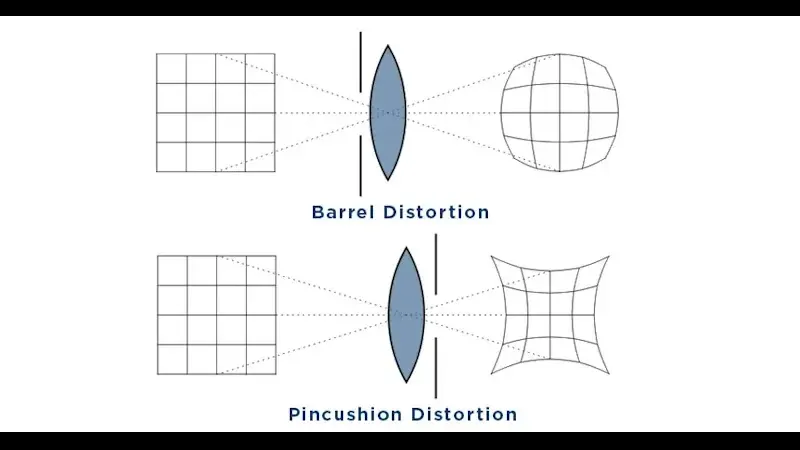
Lens distortion is an optical flaw that bends straight lines in a picture. Barrel distortion makes lines bow outward, pincushion pulls them inward, and mustache distortion combines both in a wavy pattern. It is strongest in wide-angle and zoom lenses, and profile corrections in editing software can remove most of it.
Why It Matters
Distortion matters most when straight lines are part of the subject, such as buildings, horizons, doorways and product shots. A curved horizon or leaning wall distracts the viewer from the picture.
Knowing which type your lens produces helps you choose lenses, frame carefully and correct the picture with the right tool.
Beginner Lens Distortion For Beginners
Distortion is a change in the shape of the picture across the frame, not a loss of sharpness. The lens does not map straight lines in the scene to straight lines on the sensor, so parts of the image look stretched or squeezed, usually toward the edges.
The Three Types
| Type | What You See | Common In |
|---|---|---|
| Barrel | Straight lines bulge outward from the center | Wide-angle lenses and wide ends of zooms |
| Pincushion | Straight lines pinch inward toward the center | Telephoto lenses and long ends of zooms |
| Mustache | Lines curve one way near the center and the other near the edges | Some wide zooms and retrofocus designs |
How To Spot It
- Photograph a brick wall or a grid of tiles straight on from a tripod.
- Make sure the camera is level, with the sensor parallel to the wall.
- Look at the lines near the edges of the frame.
- If the lines bow out, you have barrel distortion; if they bow in, pincushion.
Distortion Is Not Perspective
Distortion is often confused with perspective effects such as converging verticals, which happen when you tilt the camera up toward a tall building. That is a viewpoint effect, not a lens flaw, and it needs a different fix. Read about it in perspective correction and wide angle lenses.
Easy Fixes
- Turn on lens corrections in your raw editor, which applies a profile for your lens.
- Use the in-camera correction setting, if your camera has one, for JPEG files.
- Move back and zoom in a little, since distortion is usually worst at the extreme wide end.
- Keep important straight lines away from the edges of the frame.
Common Mistakes
- Fixing distortion by eye with a slider when a lens profile exists.
- Placing a horizon line near the edge of a wide shot, where curving is strongest.
- Assuming expensive lenses have no distortion, since many rely on software correction.
- Mixing up lens distortion with a tilted camera.
A Quick Summary
Barrel bulges, pincushion pinches and mustache does both. Turn on your lens profile, keep key lines away from the edges, and check the corners after correcting.
Handy for this: Carbon Fiber Tripod — sharp at slow shutter speeds. (affiliate link)
Advanced Causes, Corrections And Lens Design
Why Distortion Happens
Distortion comes from how a lens design controls the path of light through its elements. Wide-angle lenses must bend light strongly to fit a wide scene on a small sensor, and the magnification changes across the frame. When magnification grows toward the edges, you get pincushion, and when it falls, you get barrel. A mustache pattern appears when the lens has both effects in different zones. A lens that keeps straight lines straight is called rectilinear, and a fisheye lens deliberately keeps a curved projection, as described in fisheye lenses.
Measuring Distortion
Manufacturers and testers describe distortion as a percentage, which is the amount the edge of the frame is displaced compared with where it should be. A value of minus 2 percent means mild barrel, while minus 5 percent or worse is easy to see. Many modern mirrorless lenses show large raw distortion on purpose, because the camera corrects it automatically, which allows smaller and lighter optics. See lens aberrations for the other defects that lenses have.
Software Correction
Raw editors have profiles that remove distortion by remapping pixels. The correction stretches the corners, which means the edges of the frame are slightly cropped or interpolated. Profiles are very accurate for supported lenses. If your lens is not supported, use manual sliders and a grid overlay, or a perspective tool that has a distortion control. Learn the editing side in lens correction profiles and Lightroom lens corrections.
Video Considerations
Video also shows distortion, and wide action cameras often have strong barrel distortion in their default mode. Many editors have a lens correction effect, and some cameras offer a linear mode that removes distortion at the cost of a narrower view. Be careful with stabilization, since electronic stabilization crops the frame and may change the amount of visible distortion.
Using Distortion Creatively
- Barrel distortion exaggerates the foreground, which can add drama to close-up shots.
- Mild pincushion can make a frame feel compressed and tense.
- Fisheye curves can suit skateboard video, interiors and sky shots.
- Reflect on whether the correction improves the picture, and leave it on when the effect adds character.
A Correction Workflow
- Start with the lens profile in your raw editor.
- Check the straight lines, using a grid overlay.
- Adjust manually only if a few lines still curve.
- Fix the perspective or vertical lines after the distortion is corrected.
- Check the corners for stretching, and crop slightly if needed.
Choosing Lenses
If you shoot architecture, interiors or products, look for lenses with low measured distortion, such as tilt-shift or dedicated rectilinear wide-angle designs. For portraits, mild distortion matters more at close distances, where barrel distortion near the edges can stretch faces. Many prime lenses at normal focal lengths have very little distortion, as in the 50mm lens.
In practice, treat distortion as a fixed property of each lens. Learn what yours does at the focal lengths you use, and build corrections into your normal editing so every picture starts from a clean base.
Distortion And Stitching
When you build panoramas or merge photos, uncorrected distortion makes the pieces fail to line up. Apply lens corrections before stitching, or use the stitching software, which models distortion itself. For precise work such as photogrammetry and mapping, a custom calibration using a printed pattern gives better results than a generic profile.
Try It
- Photograph a wall of tiles or bricks straight on from a tripod at the widest and the longest focal lengths of a zoom.
- Open both pictures and apply the lens profile correction.
- Compare before and after using a grid overlay.
- Note which focal length shows the most distortion and avoid it for architecture.
Common Questions
Is lens distortion a defect?
It is a natural result of lens design, and it is usually small. Many modern lenses rely on software correction by design, so it is not always a fault.
Does fixing distortion reduce quality?
Slightly. The correction remaps pixels and may crop a little at the edges, but the effect is small compared with the benefit.
Which lenses have the least distortion?
Prime lenses at normal focal lengths, macro lenses and tilt-shift lenses usually have very low distortion. Wide zooms often show more.
Can I fix distortion in video?
Yes. Many editors have a lens correction effect, and some cameras offer a mode that removes distortion at the cost of a narrower view.
Related Lessons
- Lens Aberrations for other optical flaws.
- Wide Angle Lenses to see where barrel distortion appears.
- Perspective Correction for converging lines.
- Lens Correction Profiles for automatic fixes.
- Fisheye Lenses for deliberate distortion.
Gear That Helps With This
Hand-picked kit that makes this lesson easier to put into practice.
Some links are affiliate links: if you buy through them we may earn a small commission at no extra cost to you. How this works.