
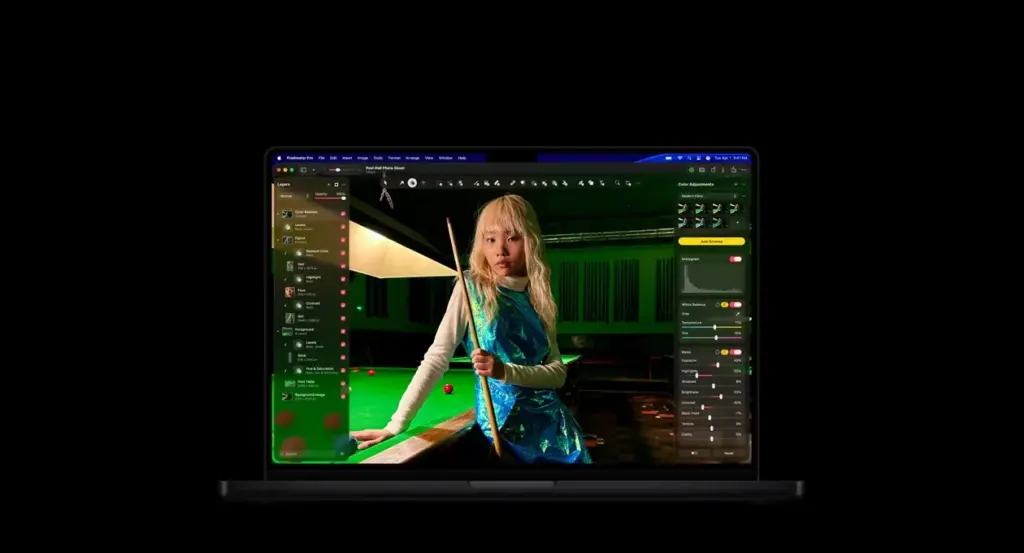
This pixelmator pro review finds a polished, layer-based photo editor designed for Apple platforms. It offers non-destructive layers, machine learning tools, retouching, vector shapes and a clean interface. It suits Mac users who want powerful editing without a subscription, though it lacks Windows support and some advanced features of Photoshop.
Verdict From This Pixelmator Pro Review
Pixelmator Pro is a full-featured image editor built specifically for Apple hardware. It takes advantage of the system graphics and machine learning engines, which makes many operations feel fast, and wraps them in a clean interface that is easier to approach than most layer-based editors.
It supports layers, masks, adjustment layers, vector shapes, text and a wide set of retouching and painting tools. Machine learning features such as automatic selection, background removal, super resolution and quick color adjustments reduce the time spent on routine tasks.
It is not a Photoshop clone, and it does not try to be. Its plug-in ecosystem is small, it is limited to Apple platforms, and some highly specialized tools are missing. For a large share of photographers and designers, however, it offers everything they actually use.
Performance and Stability
On Apple silicon the app is extremely responsive, with smooth brushes, real-time previews and fast exports even with many layers. Machine learning tools run locally and are quick on recent Macs. Older computers will feel the difference, especially with large files and heavy effects. The program is stable and integrates with system features such as Photos, iCloud and the Files app. Keeping macOS up to date ensures access to the latest processing improvements.
Key Features
Layers, Masks and Adjustments
A full layer system with blend modes, masks, adjustment layers and layer styles supports non-destructive work. If the concepts are new, start with layer masks in Photoshop, adjustment layers and blend modes, which apply the same way here.
Machine Learning Tools
Automatic subject selection, background removal and refinement save time on cutouts, as explained in subject isolation. A repair tool removes objects, similar in spirit to content-aware fill, and super resolution enlarges images with added detail.
Retouching and Painting
Healing, clone, liquify and a good brush engine handle portrait and product retouching. The approach matches healing and clone tools and the liquify filter. Dodge and burn work well, as described in dodge and burn.
Color and Raw Editing
Curves, levels, color adjustments and a raw processing panel give strong tonal control, and the curves tool behaves as you would expect. Support for wide-gamut color and Apple color management keeps images accurate across devices, linking to ideas in a color managed workflow.
Vector Shapes and Design Tools
Shapes, text and vector paths let you build graphics, posters and social posts without switching programs. Quick actions and presets speed up common tasks, and export options cover web, print and social formats.
Learning Curve
The interface is clean and the tools are clearly labeled, so newcomers can start editing quickly. People who know Photoshop will find the concepts familiar, though menus and shortcuts differ. A free trial is typically offered, and the built-in tutorials and Apple-style help make it easy to learn the basics within an afternoon.
Apple Ecosystem Integration
Pixelmator Pro connects with Photos, iCloud, Shortcuts and other system features, and a version for iPad allows editing on the go. Documents can sync between devices through iCloud. That tight integration is a major advantage for people who already use Apple devices throughout their workflow.
Where It Falls Short
There is no Windows version, a limited plug-in ecosystem and fewer advanced tools than Photoshop for tasks like complex compositing or extensive scripting. Collaboration and cloud asset libraries are lighter. If your clients exchange layered PSD files with specialized features, check compatibility with your real files first.
Value for Money
Because it is sold as a paid app rather than an ongoing subscription in most cases, the long-term cost can be far lower than a monthly plan. That value is a major reason many Mac users choose it over heavier alternatives.
Practical Tips For New Users
Work non-destructively wherever you can: keep adjustments on separate layers, use masks rather than erasing, and duplicate a layer before a risky edit. Save a layered copy in the native format and export finished files separately for web or print. Set your color space once at the start so exports stay consistent. These habits cost a few seconds each and save hours when a client asks for a change after delivery.
File Formats and Export
The app opens and saves common formats including JPEG, PNG, TIFF, HEIC and PSD, and it can export for web with sensible compression. Its own layered format keeps every layer editable. When exchanging files with clients, export a flattened copy as well, so nobody needs the app just to view the result.
Final Thoughts
Pixelmator Pro is a refreshing alternative to heavyweight editors. It is quick, attractive and capable, and it handles the bulk of everyday photo and design work with ease. If you are on a Mac and tired of subscriptions, give the trial a serious go. Open a few of your own files, try the selection and repair tools on real problems, and judge the speed and results for yourself, since the best editor is simply the one you will happily open every day and that keeps up with the way you work.
Pricing
Pixelmator Pro is sold as a paid app through the Mac App Store, with a companion version for iPad. It has been offered as a one-time purchase in the past, and Apple has also included it in some subscription bundles, so the arrangement may vary.
Because the model and the price have changed, check the vendor site for current pricing before buying. A free trial is often available, which is the best way to test whether it handles your files and your workflow.
Pros and Cons
What Works Well
- Polished, fast interface on Apple hardware
- Powerful layers, masks and adjustment layers
- Useful machine learning tools for selection and repair
- Lower long-term cost than a subscription
- Good integration with Photos, iCloud and iPad
What Holds It Back
- Apple platforms only
- Smaller plug-in ecosystem
- Fewer advanced tools than Photoshop
- Limited collaboration features
Who It Is For
It suits Mac and iPad users who want a capable layer-based editor without the weight of Photoshop. Photographers who retouch, designers who make simple graphics, and hobbyists who want powerful tools in a friendly package will all feel at home.
It is a poor fit for Windows users and for studios locked into Photoshop-specific workflows. If your work depends on scripts, actions and plug-ins, test carefully. A good starting habit is to study the basics of smart objects and selection tools, because the same ideas apply here.
Alternatives
Several editors compete in this space.
| Alternative | Best Reason To Pick It |
|---|---|
| Adobe Photoshop | Industry standard with the deepest toolset |
| Affinity Photo | One-time purchase and available on Windows |
| Adobe Lightroom | Best for organizing and toning photo libraries |
| GIMP | Free and open source, with a steeper learning curve |
If you use a Mac and want value, try Pixelmator Pro. If you share files across platforms or depend on plug-ins, Photoshop or Affinity may suit better.
Common Questions
Is Pixelmator Pro available for Windows?
No. It is designed for Apple platforms, with versions for Mac and iPad.
Is Pixelmator Pro a good Photoshop alternative?
For many Mac users, yes. It covers layers, masks and retouching, though it has fewer specialist tools.
Does Pixelmator Pro need a subscription?
It has typically been a paid app rather than a monthly subscription. Check the vendor site for current pricing.
Can Pixelmator Pro open PSD files?
Yes, it can open and save PSD files, though complex features may not carry over perfectly.
Try It Yourself
See what it can do on your own photos and footage.
Some links are affiliate links: if you buy through them we may earn a small commission at no extra cost to you. How this works.