
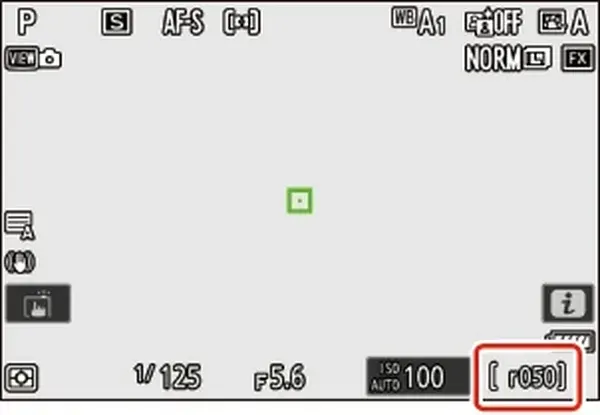
The camera buffer is fast memory that holds photos before they are written to the memory card. When you shoot a burst, images fill the buffer faster than the card can empty it. Buffer depth is the number of frames you can shoot before the camera slows down, and a faster card and smaller files make it last longer.
Why It Matters
Sports, wildlife and action pictures depend on bursts. If the buffer fills at the decisive moment, the camera slows to a crawl and you miss the shot.
Knowing how the buffer works helps you choose the right file format, card and burst mode, so the camera keeps up when it counts.
Beginner The Camera Buffer For Beginners
When you press and hold the shutter, the sensor produces images much faster than a card can store them. The camera places each image in a temporary memory area called the buffer. At the same time, it writes images from the buffer to the card. As long as the buffer has room, the burst continues at full speed. When it is full, the camera slows to the pace of the card.
Key Terms
| Term | Meaning |
|---|---|
| Burst rate | Frames per second the camera can shoot, such as 10 or 20 |
| Buffer depth | How many frames can be shot before slowing |
| Write speed | How fast data reaches the card |
| Clearing the buffer | Time needed to empty it to the card |
What Changes The Buffer
- File type: raw files are larger than JPEGs, so fewer fit in the buffer.
- Raw compression: compressed raw uses less space than uncompressed raw.
- Resolution: high megapixel cameras fill the buffer faster.
- Card speed: faster cards empty the buffer sooner.
- Shooting mode: electronic shutter modes are often faster but can have a different buffer depth.
How To Tell The Buffer Is Full
Most cameras show a number or a bar in the viewfinder that counts how many shots remain. When it reaches zero, the burst slows and the card access light stays on. The display usually shows the number returning when the buffer clears.
Simple Ways To Make It Last
- Use a card with a high write speed that your camera supports, as described in SD card speed.
- Choose compressed or medium-sized raw files if your subject does not need the maximum resolution.
- Shoot short bursts at the right moment instead of holding the button.
- Turn off extra processing such as noise reduction on long exposures when sports speed matters.
- Format the card in the camera before an event.
Common Mistakes
- Buying the cheapest card for a camera that needs a fast one.
- Holding the shutter button through the entire action, instead of timing bursts.
- Assuming the advertised burst rate can be kept indefinitely.
- Using a card that is nearly full, which can slow writing.
How Long Until It Clears
After a long burst, clearing time may take several seconds or more with a slow card. During this time, some cameras block menu access or limit shooting. Avoid turning the camera off until the access light stops, since interrupting a write can corrupt the last images.
Handy for this: Carbon Fiber Tripod — sharp at slow shutter speeds. (affiliate link)
Advanced Memory Architecture, Cards And Real Limits
Why The Numbers Differ
Manufacturers state buffer depth for specific conditions, such as a particular card, file type and ISO. High ISO files are more complex and compress less well, so they take up more space. Lossless compressed raw files vary in size depending on the scene, which means buffer depth can change from one burst to another. Treat published numbers as the best case.
Write Speed And Card Standards
The card must write data as fast as the buffer feeds it. The key numbers are sustained write speed, not the headline read speed on the packaging. Card families such as UHS-II SD, CFexpress and XQD or newer standards provide different maximums. A camera with dual slots may write to both at once, and the slower card can limit the buffer. The lesson on memory card types compares the formats, and dual card slots explains how to set them up.
Electronic Shutter And Burst Speed
Electronic shutters allow very fast bursts, sometimes beyond 30 frames per second. They have a rolling shutter effect, so fast-moving subjects may skew, and some cameras limit bit depth in these modes. The faster rate fills the buffer more quickly, so you may get a shorter burst in time even if the number of frames is similar. See electronic shutter and rolling shutter for the tradeoffs.
Pre-Capture And Pre-Burst
Some mirrorless cameras can record frames before you press the button fully, holding a continuous loop in the buffer and saving the last second or so when you fire. This is excellent for birds taking off, but it uses buffer space and battery, so enable it only when needed. Related settings are covered in drive modes and burst.
Reducing The Load
- Use medium raw or compressed raw when you do not need full resolution.
- Shoot JPEG for bursts that only need to be shared quickly, or use raw plus JPEG only when necessary.
- Reduce the burst rate to a mid setting. A steady 10 frames per second can last far longer than 20.
- Switch off functions that add processing, such as in-camera lens correction or long exposure noise reduction.
- Carry spare cards and swap them at breaks, since write speeds fall as cards fill and warm up.
Planning For Events
For a race or match, pick the setting with the longest useful burst, and time your bursts around peak moments such as a jump, a catch or a bird launch. Keep an eye on the buffer counter. In long sessions, give the camera a short pause during lulls so the buffer clears. Practice in advance so you know how many frames you get with your actual card and settings.
Over time, test your camera yourself. Shoot a burst until it slows, count the frames, and repeat with different file types. Writing those numbers down gives a real buffer budget for each situation.
Firmware And Settings That Matter
Camera updates sometimes improve buffer handling or add new compression options, so keep firmware current by following camera firmware update. In menus, look for options named continuous shooting limits, raw compression type and image processing priority. Setting these to the shortest processing path gives the most reliable performance.
Try It
- Set your camera to continuous high-speed drive with raw files.
- Press and hold the shutter on a moving scene until the camera slows, and count how many frames you shot.
- Change to compressed raw or a smaller size and repeat.
- Write down the frame counts and how long the buffer takes to clear for each setting.
Common Questions
How big a buffer do I need?
It depends on your subject. For birds in flight and sports, 50 or more raw frames is comfortable, while portraits and landscapes need almost none. Match the camera and settings to your longest bursts.
Does a faster card increase buffer depth?
Not the size of the buffer, but a faster card clears it sooner, so the camera recovers quickly and may sustain a longer burst overall.
Why is my burst slower than the advertised rate?
The advertised rate often applies to a specific mode, such as electronic shutter, with certain lens settings. Autofocus tracking, a slow lens or a slower card can reduce it.
Is JPEG better for bursts?
JPEG files are smaller, so the buffer lasts longer, but they give less editing room than raw. Use JPEG for casual action and raw when quality matters most.
Related Lessons
- Drive Modes And Burst for choosing the right continuous mode.
- SD Card Speed to read the numbers on a memory card.
- Memory Card Types for comparing SD, CFexpress and other formats.
- Electronic Shutter to understand fast silent bursts.
- Sports Photography Settings for settings that use bursts well.
Gear That Helps With This
Hand-picked kit that makes this lesson easier to put into practice.
Some links are affiliate links: if you buy through them we may earn a small commission at no extra cost to you. How this works.