
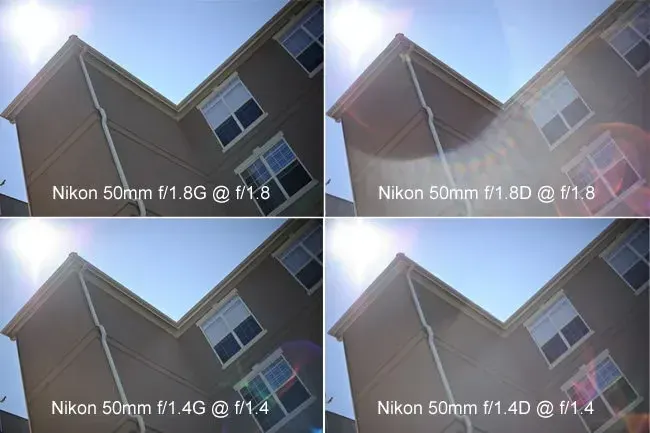
Preventing lens flare means stopping bright light from entering the lens at angles that bounce around inside it. Shade the front of the lens with a hood, hat or hand, shift your position so the sun leaves the frame, keep the glass clean and remove extra filters, then check the viewfinder and the first frame.
Why It Matters
Flare lowers contrast, adds colored shapes and can turn a rich scene into a gray haze. Sometimes it is a pleasing effect, but when you did not choose it, flare can ruin the shot that you traveled a long way to take.
Most of the cure is simple field craft, done before you press the shutter. Learning to see flare coming, and to block it with whatever you have in hand, costs nothing and works with any lens, from a phone to a large telephoto.
Beginner Preventing Lens Flare: Quick Field Fixes
Flare happens when light from a strong source, usually the sun or a lamp, enters the lens and reflects between glass surfaces and the lens barrel. It shows up in two main forms. Veiling flare is a milky, low-contrast haze across the picture. Ghosting appears as colored discs or polygons that mirror the shape of the aperture. A source just outside the frame can cause either one.
Seven Quick Fixes
- Attach the lens hood and make sure it is fully extended and locked.
- Shade the lens with your free hand, a hat or a piece of card, held just outside the frame edge so its shadow falls over the front glass.
- Change your position by a step or two so the sun moves behind a tree, a pole or a building.
- Lower or raise the camera so the sun leaves the top or the side of the frame.
- Wipe the front element with a clean microfiber cloth to remove fingerprints and dust.
- Remove a cheap clear filter if you see ghost discs.
- Take a test shot and zoom in on the screen, checking the corners and the area opposite the light source.
What Makes Flare Worse
| Cause | Effect | Fix |
|---|---|---|
| Sun in or near the frame | Strong ghosts and haze | Move, shade or block the sun |
| Dirty front glass | Soft veil over the whole picture | Clean the lens |
| Stacked filters | Extra reflections and ghosts | Remove filters |
| Missing or wrong hood | Stray light from the side | Fit the correct hood |
| Wide aperture and wide angle | Large colored blobs | Reframe or stop down |
Use Your Hand Like A Flag
Look through the viewfinder or at the screen and raise your hand until the flare disappears, then check that your fingers are not in the frame. A hat held at arm’s length works for wide lenses. If you shoot from a tripod, ask a friend to hold a dark board over the lens or tape a card to a light stand so you can use both hands on the camera.
Common Mistakes
- Trusting a small screen and failing to notice the haze until you view the picture on a computer.
- Leaving a hood reversed or half attached after packing the camera.
- Pointing straight at the sun with the lens wide open.
- Assuming an expensive lens cannot flare. Coatings help, but they do not remove it.
Sometimes the best answer is to enjoy the flare. A small amount can add warmth and atmosphere, especially in backlit portraits. The point is to decide for yourself instead of finding it in the picture later.
Handy for this: Carbon Fiber Tripod — sharp at slow shutter speeds. (affiliate link)
Advanced Hood Design, Filters, Coatings And Flags
How A Hood Works
A hood cuts off light that comes from outside the field of view, before it reaches the front glass. Petal-shaped hoods are cut to match the sensor’s field, so they give maximum protection without clipping the corners. A deeper hood blocks more light, but it must not cut into the frame at the widest focal length of a zoom lens. A hood cannot stop light coming from within the picture area, and a source inside the frame still causes flare. Read lens hood for how to choose one. When a hood is not enough, a matte box or a flag adds more reach.
Coatings And Lens Design
Anti-reflective coatings reduce the share of light bouncing off each glass surface, and nano-structure coatings reduce it further. A lens with fewer elements, such as many primes, has fewer surfaces to reflect from, so a simple prime often flares less than a long zoom. Coatings work best when light enters head on. Light striking the glass at a steep angle can overcome them, which is why a source just outside the frame still causes trouble. The causes are covered in lens flare.
Filters Cause Ghosts
A filter adds two more air-to-glass surfaces. In backlit scenes, light bounces between the filter and the lens to produce ghost images that look like a smaller bright spot opposite the sun. Remove protective filters when the sun is in or near the frame. If you need a polarizer or a neutral density filter, buy good ones with multi-coatings and keep them clean. A polarizer can also cut some veiling haze from sky and glass, but it will not remove ghosts.
Aperture And Starbursts
Stopping down to f/11 or f/16 turns the sun into a crisp starburst and shrinks the ghost discs. If the flare you see is large and soft, a smaller aperture may make it more defined but less distracting. If you want to remove it, change the angle. Do not rely on a single setting, because each lens behaves differently, and wide-angle lenses with curved front elements are more prone to catching the sun.
Techniques For Hard Backlight
- Place the sun behind an object, such as a trunk or a figure, so that most of it is blocked and a rim of light remains.
- Shoot a flare-free frame and a creative one, then choose later.
- Use a black card on a stand as a flag, placed to cast a shadow on the lens while staying outside the frame.
- Take a second frame with the sun blocked by your hand and blend it with the first in software if the camera was on a tripod.
- Lower the contrast of the scene by exposing for the subject, as in rim light and silhouettes, and let the sky clip.
Fixing Flare In Editing
Mild veiling haze can be reduced with the dehaze slider, by lowering the black level or by adding contrast with a tone curve. Ghost discs can be cloned out if they sit on simple areas such as sky. Heavy flare cannot be fully repaired, so aim to prevent it in the field. A reference frame with the sun blocked gives you clean material to blend in later.
Video And Moving Light
In video, flare changes as you move, so check the full move and not just the start. Use a matte box or flag, and watch for a ghost that suddenly appears at the end of a pan. See direction of light for planning angles before the shoot.
Try It
- Shoot a backlit scene with the sun just out of frame, once with the hood and once with a hat shading the lens, and compare contrast.
- Take the same shot with a clear filter on and off and look for ghost discs.
- Shoot at f/2.8, f/8 and f/16 with the sun in the frame and compare the flare shapes.
- Clean the front glass, then shoot again and notice any difference in contrast.
Common Questions
Does a lens hood prevent all flare?
No. A hood blocks light from outside the frame, but it cannot stop a source inside the frame. Use it together with shading, clean glass and a position that keeps the sun out of view.
Why do I get colored circles in my photos?
They are ghosts made when bright light bounces between glass surfaces. Their shape matches the lens aperture. Remove filters, change your angle or stop the source from entering the lens.
Is lens flare always bad?
No. A small amount can add warmth and mood, especially in backlit portraits. It becomes a problem when it lowers contrast, covers a face or distracts from the subject without your choice.
Can I remove flare in editing?
Mild haze can be lessened with dehaze and contrast adjustments, and small ghosts can be cloned out of simple areas. Strong flare is hard to repair, so prevent it when you shoot.
Related Lessons
- Lens Flare for what causes it and how it looks.
- Lens Hood for choosing and using a hood properly.
- Direction Of Light for planning where the sun should be.
- Rim Light Silhouettes for working with strong backlight.
Gear That Helps With This
Hand-picked kit that makes this lesson easier to put into practice.
Some links are affiliate links: if you buy through them we may earn a small commission at no extra cost to you. How this works.